
Understanding the cost of boosting a post on Facebook is the foundation for running campaigns that perform well without overspending. When you know what affects pricing, how boosted posts work, and the strategies that reduce costs, you can turn simple content into a high-impact asset. This guide breaks down key factors, real examples, and practical tips to help you boost smarter and drive stronger results.
Overview & what a boosted post is
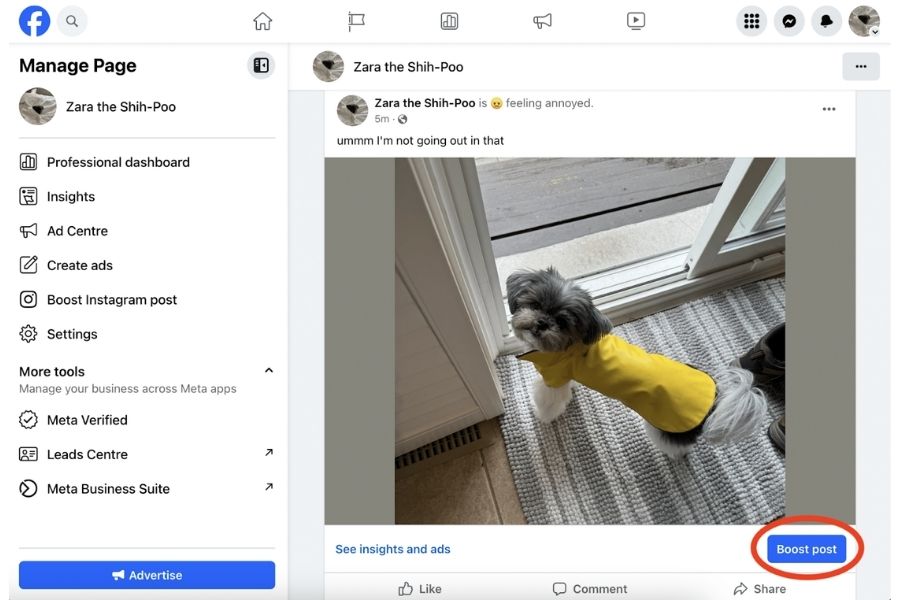
A boosted post on Facebook is a paid promotion of content already published on your Page. Boosting helps you reach more people, including those who do not follow your Page yet. This simple method can increase engagement, attract leads, and grow brand awareness.
When you boost a post, you can:
- Reach new users likely to be interested in your business.
- Encourage more video views, messages, or calls.
- Highlight offers, events, or special content without creating a new ad.
For example, a café sharing a post about a new menu can boost it to reach more local customers. The post can generate additional engagement like comments, shares, and clicks, helping the café attract people who haven’t heard of it before.
The cost of boosting posts on Facebook depends on factors such as audience size, duration, and targeting choices. You can set a daily or total budget to control spending. This flexibility ensures businesses of any size can use boosted posts effectively to gain visibility and potential customers.
How boosting a post on Facebook works
Boost Post turns a regular post into an ad. You choose your goal (engagement, views, website visits), set your audience, and define your budget and duration. After that, Facebook automatically shows your boosted post to people who are most likely to engage or take the action you want. Understanding this flow also helps you manage the cost of boosting a post on Facebook more effectively.
Businesses often use Boost Post because it pays not just for exposure but also for better performance, stronger ROI, and wider reach beyond organic limits.
Here are the key benefits of using Boost Post:
- Reach people outside your existing audience: Boosting helps your content appear in front of users who haven’t followed your Page yet, allowing you to grow brand exposure in new segments or regions without relying solely on organic reach.
- Highlight promotions, launches, or important updates: From new product releases to seasonal campaigns, a boosted post ensures your message spreads quickly. It’s especially effective for time-sensitive announcements that need fast visibility.
- Spark more interactions on your post: When more users react, comment, or share, Facebook reads your content as valuable. This momentum can strengthen your post’s overall performance and improve your future organic reach.
- Send high-quality visitors to your site or shop: With an added CTA button, boosted posts can guide the right users to your website or online store. This supports goals like Facebook Ads lead generation, product conversions, or increased blog visits with clearer ROI tracking.
Key factors that influence the cost of boosting a post on Facebook
Before exploring each element in detail, it’s important to understand how these variables shape the cost of boosting a post on Facebook. The factors below show what drives your budget up or down and why your results may differ across campaigns.
Audience size & targeting
Reaching a wider group typically requires more budget since your content appears in front of more users. Targeting a specific segment can reduce wasted impressions. The more accurate your audience, the more efficient your spend.
Location & competition
Pricing varies by region and industry. Markets with high advertiser demand tend to be more expensive. When many brands compete for the same audience, the overall cost rises.
Objective & optimization
Your campaign goal influences bidding. Objectives focused on conversions usually require higher bids compared to awareness-driven boosts. How you optimize delivery also affects how Facebook allocates your funds.
Creative quality & relevance score ad relevance diagnostics
Eye-catching visuals and clear messaging help improve your Quality Ranking, Engagement Rate Ranking, and Conversion Rate Ranking. To stay competitive, many advertisers now integrate Facebook Ads AI tools to generate high-performing creatives and copy.
When your ads score higher across these relevance diagnostics, they’re more likely to receive stronger delivery and better placements – meaning you can achieve more results with the same budget.
Platform fees & taxes
Your balance reflects deductions and extra charges. Service fees for in-app purchases, regional levies, and estimated taxes can reduce usable funds. Rounding rules may adjust the amount you add to meet platform rules. These elements affect final billing and available ad funds.
Cost of boosting a post on Facebook vs Ads Manager
Understanding the cost of boosting a post on Facebook becomes much clearer when you compare it directly with Ads Manager. While the Boost Post button offers speed and simplicity, Ads Manager provides deeper control, smarter optimization, and better cost efficiency for most performance-driven campaigns.
Below is a detailed analysis table to compare Boost Post vs Facebook Ads Manager:
| Criteria | Boost Post (1-Click Promotion) | Facebook Ads Manager (Advanced Advertising) |
| Purpose | Designed for quick, simple exposure, such as engagement or basic traffic. | Built for full-funnel campaigns, including awareness, traffic, leads, sales, and remarketing. |
| Targeting Options | Limited to basic interests, location, or a simple lookalike audience. | Highly detailed targeting: demographics, behaviors, placements, custom audiences, and advanced lookalikes. |
| Ad Formats | Only uses the original Page post with minimal customization. | Supports all formats: images, videos, carousel, Reels, collections, lead forms, and more. |
| Cost Control | Lower control; runs on a set budget with fewer optimization levers. | Full budget flexibility with daily/lifetime options, bid caps, and optimization for CPA, CPC, or CPM. |
| Optimization Tools | Minimal; focuses on visibility without deeper algorithmic tuning. | Strong optimization powered by Facebook’s delivery system for conversions, link clicks, or other actions. |
| Reporting & Insights | Basic metrics such as reach, reactions, comments, and clicks. | Advanced analytics using professional Facebook Ads analytics tools, including attribution, conversion tracking, split tests, and custom reporting. |
| Typical Cost Efficiency | Often higher cost per result due to broad delivery. | Usually, lower cost per action thanks to tighter targeting and smarter optimization. |
If you need a fast, lightweight promotion, boosting a post is convenient. But if your goal is to lower the overall cost of boosting a post on Facebook, reach the right audience, and run campaigns with stronger ROI, then Ads Manager is the essential tool. It offers the precision, flexibility, and optimization power needed for scalable, cost-effective advertising.
Cost of boosting a post on Facebook in real life
Seeing real numbers makes the cost of boosting a post on Facebook easier to understand, especially for beginners. The examples below follow the same structure as the reference case studies, showing goals, setup, and estimated outcomes so you can picture how budgets behave in real campaigns.
Example 1: Café Bloom – Using a Boosted Video to Spark Local Interest
Business Snapshot: Café Bloom is a plant-focused brunch spot based in Austin, Texas. After completing a full interior refresh, the café wanted a strong reopening weekend and hoped to bring back nearby customers.
Goals:
- Encourage in-person visits during the reopening
- Promote a limited 15% discount for walk-in customers
- Reach students and young professionals in the area
Boost Details:
- Post format: A short video slideshow highlighting the updated space and smoothie lineup
- Targeting: Ages 18–40, within roughly a 10-mile radius of Austin; interests include vegan dishes and coffee culture
- Total spend: $75 spread across 5 days
- Objective: Engagement and message interactions
- Call to action: “Show this post for 15% off!”
Performance:
| Metric | Result |
| Reach | 18,200 individuals in the local area |
| Engagement | 2,450 interactions |
| Message taps | 138 |
| Discount redemptions | 92 customers |
| Cost per engagement | ~ $0.03 |
What it shows: By relying on eye-catching visuals and focusing on people close by, Café Bloom converted a small investment into real café traffic and on-site coupon use – without running a full-scale ad campaign.
Example 2: Jasper’s Market – Using Visual Variety to Highlight Products
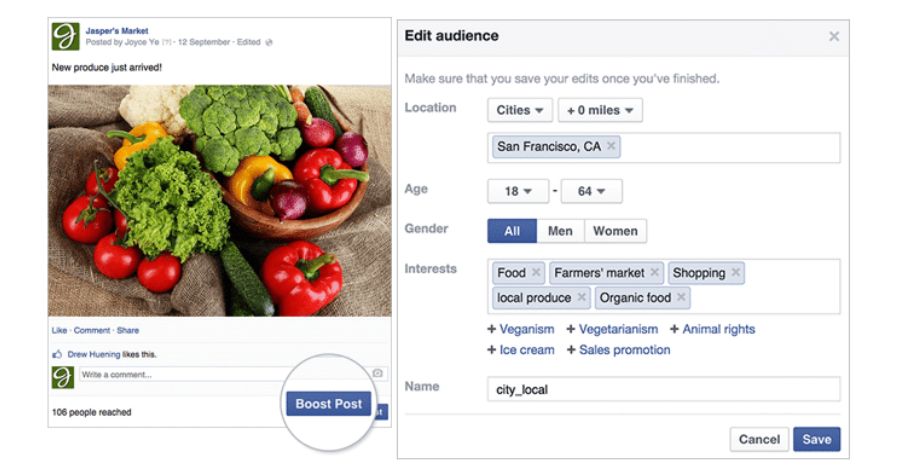
Business Snapshot: Jasper’s Market is Meta’s long-standing demo brand representing a small grocery chain. It is frequently used to showcase real advertising workflows to businesses.
Goals:
- Raise awareness of their fresh juice collection
- Bring new shoppers from the surrounding area
- Reinforce their local identity as a produce-first market
Boost Details:
- Post format: A slideshow of vibrant juice blends featuring different fruit combinations
- Caption: “Try something fresh this weekend – your new favorite juice is waiting.”
- Targeting: Residents in San Francisco aged 18–55 with interests like organic food, farmers’ markets, and fresh ingredients
- Budget: $100 running over 7 days
- Objective: Page engagement
Performance:
| Metric | Result |
| Reach | 25,600 local users |
| Engagement | 3,300 total interactions |
| New followers | 147 additional page likes |
| Promo interest | 88 coupon downloads |
| CTR | 4.3% |
What it shows: Through strong visuals and locally relevant messaging, Jasper’s Market used a simple boost to build brand familiarity and highlight its product range at a reasonable cost.
Key Lessons from Both Examples
Both case studies – one real and one representative – demonstrate that boosted posts can deliver meaningful results when used intentionally. Businesses used them to:
- Strengthen local visibility
- Match tailored visuals with the right target audience
- Push users toward a specific action, such as a store visit or a promo interaction
Overall, these examples reinforce that successful Facebook boosting doesn’t rely on large budgets. Instead, it depends on clear goals, good creativity, and relevant calls to action.
Tips to reduce the cost of boosting a post on Facebook
Understanding how to spend smartly can lower the cost of boosting a post on Facebook while keeping results strong. These strategies focus on targeting, creative quality, testing, and measurement. Following them ensures each dollar works harder for engagement, clicks, or conversions.
Before diving into specifics, remember: Small changes in targeting, content, or timing can make a big difference in performance and cost efficiency.
Target broader first, then narrow by performance
Start by reaching a wider audience. Let Facebook’s algorithm identify who interacts most with your post. After a few hours or a day, focus on the segments giving the best results.
- Broad targeting helps gather initial engagement quickly.
- Narrowing later reduces spending on low-performing groups.
This approach lowers wasted budget and keeps the cost of boosting a post on Facebook manageable, especially for smaller campaigns.
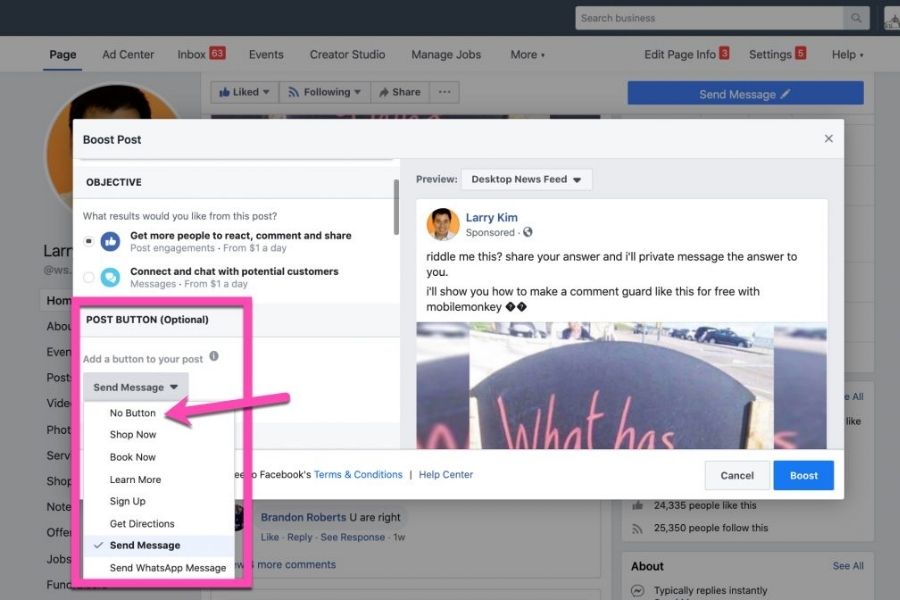
Improve creative & use strong CTA
High-quality visuals and clear messaging are key to engaging users and getting clicks.
- Use sharp images or short, engaging videos.
- Write concise captions with a direct CTA, such as “Shop Now” or “Learn More.”
- Highlight offers or benefits early in the content.
Strong creative keeps users interested and reduces the amount spent per action, improving the cost of boosting a post on Facebook.
Test multiple posts and A/B test headlines/images
Testing helps you find which post formats and messages work best.
- Run small boosts for a few different posts.
- Compare headlines, images, or video formats.
- Boost the top performers only.
By promoting only the posts that prove effective, you maximize results while keeping the cost of boosting a post on Facebook low.
Use pixel tracking & measure conversions
Tracking performance beyond clicks is essential for optimization. Implementing tracking allows you to monitor the actual cost per lead Facebook campaigns generate
- Install Facebook Pixel to follow actions on your website.
- Measure conversions, purchases, or lead sign-ups.
- When scaling budgets, consider moving the campaign to Ads Manager for precise optimization.
This ensures you spend smartly, control the cost of boosting a post on Facebook, and improve ROI over time.
FAQs – Cost of boosting a post on Facebook
What’s the minimum to boost a post?
You can start boosting a post with as little as $1 per day, but most effective boosts fall in the range of $5–$20 per day. The total cost of boosting a post on Facebook depends on your daily budget multiplied by the number of days you run the campaign. Facebook also provides estimated reach to help predict performance.
Will I be charged extra fees?
When boosting, the budget you set is usually the total cost, but platform fees or taxes may apply depending on your payment method and region. Always check the payment summary before confirming.
Can I track conversions from a boosted post?
Yes. Boosted posts provide basic metrics like reach, clicks, reactions, and comments. For website traffic or sales, use Facebook Pixel or UTM tracking to monitor conversions in Google Analytics. This helps measure ROI and understand how the boost affects your business goals.
Is boosting cheaper than running ads?
Boosted posts are simpler and easier to set up, often making them cost-effective for small campaigns or high-performing organic content. However, Facebook Ads through Ads Manager offer advanced targeting, A/B testing, and optimization. For larger campaigns or full-funnel strategies, Ads Manager may provide better results per dollar spent.
Mastering the cost of boosting a post on Facebook ensures that every dollar you spend delivers value. By carefully targeting audiences, using strong creative, and monitoring performance, businesses of all sizes can achieve better reach and engagement. For teams looking to scale quickly without setting up new accounts from scratch, NEMI Ads offers trusted ad account rental services, allowing you to launch campaigns immediately and efficiently manage your Facebook advertising budget.
NEMI Ads provides reliable Invoice ad accounts, giving you instant access to stable, high-trust advertising environments. If you’re looking to scale quickly, a Facebook ads account for rent can be a convenient option, allowing you to bypass setup delays. With NEMI, you benefit from fast campaign activation, higher account credibility, smoother billing, and consistent ad delivery, all while managing your Facebook budget more efficiently.