
Facebook ads image checker is one of the most useful tools for advertisers who want to avoid wasting budget on poorly designed ad images. Many Facebook ads fail to deliver well simply because the image contains too much text or does not follow Meta’s recommended layout rules. Before launching any campaign, checking your creatives with a facebook ads image checker can help improve reach, reduce costs, and prevent delivery issues. In this guide, you will learn how the tool works, how Facebook text rules have changed, and how to optimize ad images for better performance.
1. Why You Should Use A Facebook Ads Image Checker For Ad Images
Running Facebook ads without checking your images first can reduce reach, increase costs, or even prevent ads from delivering. That’s why many advertisers use a facebook ads image checker before launching campaigns. This tool helps you review text overlay, layout, and visual balance to make sure your ad follows Meta advertising guidelines.
1.1. What is facebook ads image checker
A facebook ads image checker is a tool that analyzes ad images to see whether they meet Facebook’s recommended text‑to‑image ratio. In the past, Facebook had strict rules about how much text could appear on an ad image. Even though the policy has changed, text overlay still affects ad performance today.
Using a facebook ads image checker helps advertisers preview how their image may be evaluated by the ad system before spending money on campaigns.
1.2. Why checking text ratio is important before running ads
Text placement on images can influence how Facebook distributes your ads. If an image contains too much text, the system may limit delivery or increase the cost per result.
With a facebook ads image checker, advertisers can detect problems early and adjust the design before publishing the ad. This saves budget and improves the chance of reaching the right audience.
1.3. How text overlay affects ad delivery
Meta’s advertising system prefers images that focus on visuals instead of large text blocks. Ads with clean designs often get better engagement, which helps the algorithm show them to more people.
A facebook ads image checker allows you to test different versions of the same image to see which one follows best practices. This is especially useful for marketers running multiple campaigns at the same time.
1.4. When you should use an image checker
You should use a facebook ads image checker whenever you create new ad creatives, especially in these situations:
- Before launching a new campaign
- When ads have low reach or high cost
- When using images with text overlay
- When designing promotional banners
Checking images before publishing helps avoid common mistakes and keeps your ads compliant with Meta guidelines.
2. Facebook 20% Text Rule Explained (Old vs New Policy)
Many advertisers still talk about the 20% rule when discussing a facebook ads image checker, but the policy has changed over time. Understanding the difference between the old rule and the current Meta policy helps you create better ad images.
2.1. Origin of the 20% text rule
Facebook introduced the 20% text rule years ago to improve user experience. The platform wanted ads to look more like normal posts instead of banners full of text.
Because of this rule, advertisers often used a facebook ads image checker to make sure text did not cover more than 20% of the image. If the limit was exceeded, ads could be rejected or shown to fewer people.
2.2. How the old Facebook text limit worked
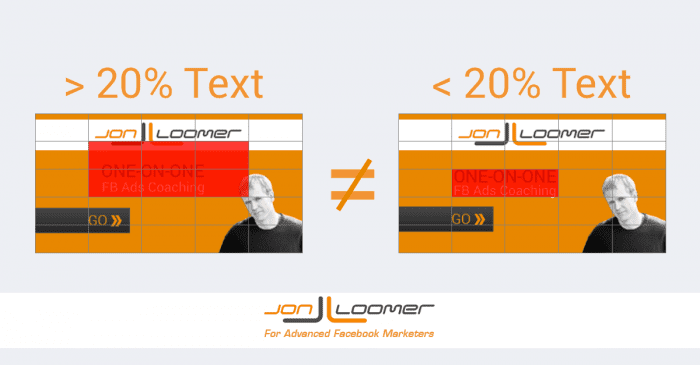
Under the old system, Facebook used a grid tool to measure text overlay. Images with too much text were marked as high text density and had limited delivery.
Many marketers relied on a facebook ads image checker to avoid wasting time submitting ads that would not run. The rule forced advertisers to focus on visuals instead of long messages.
2.3. Current Meta advertising policy
Today, Meta no longer blocks ads based only on text percentage. However, the platform still recommends using minimal text on images. According to official advertising guidelines, ads with less text usually perform better and reach more users.
A facebook ads image checker is still useful because it helps keep your creatives clean and aligned with current best practices, even though the strict 20% limit is gone.
2.4. Does Facebook still limit text on images?
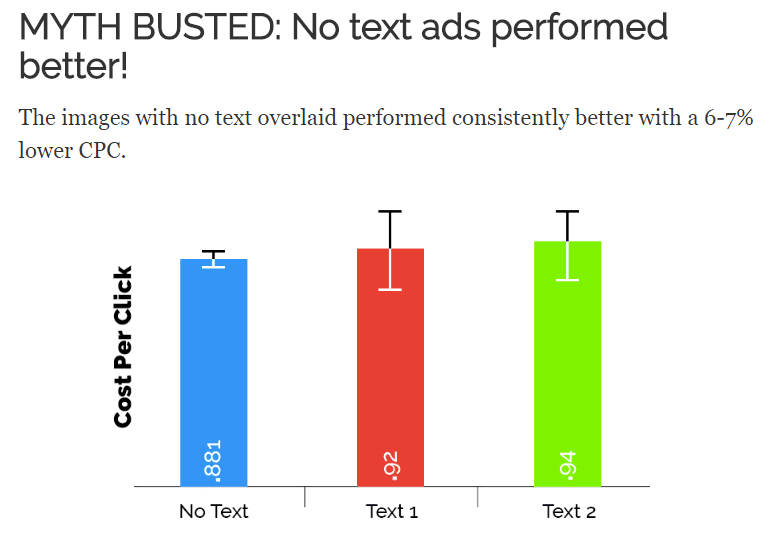
Facebook does not strictly ban images with a lot of text anymore, but high text overlay can still reduce performance. Ads with too much text may get lower reach, higher cost per click, or weaker engagement.
This is why many advertisers continue using a facebook ads image checker to review creatives before launching campaigns. Following recommended design guidelines often leads to better results.
3. How Text on Images Affects Facebook Ads Performance
Text overlay plays a big role in how ads perform. Even without a strict rule, Facebook’s algorithm still prefers images that are easy to view and understand. Using a facebook ads image checker helps you see whether your design is likely to perform well.
3.1. Low text overlay vs high text overlay
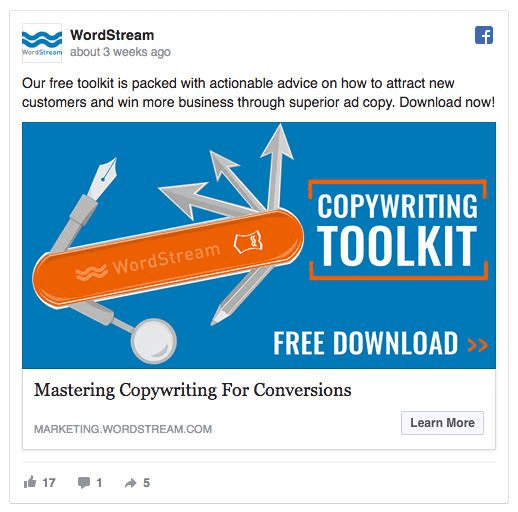
Images with low text overlay usually look cleaner and attract more attention in the feed. They are easier to read on mobile devices, which is where most users see ads.
A facebook ads image checker can help compare low‑text and high‑text versions of the same ad to see which one follows recommended design standards.
3.2. How too much text reduces reach
Too much text can make ads look like spam or banner ads. When users ignore an ad, engagement drops, and the algorithm may stop showing it to more people.
By using a facebook ads image checker, advertisers can reduce text size, move text to captions, or redesign the image to improve delivery.
3.3. Examples of good vs bad ad images
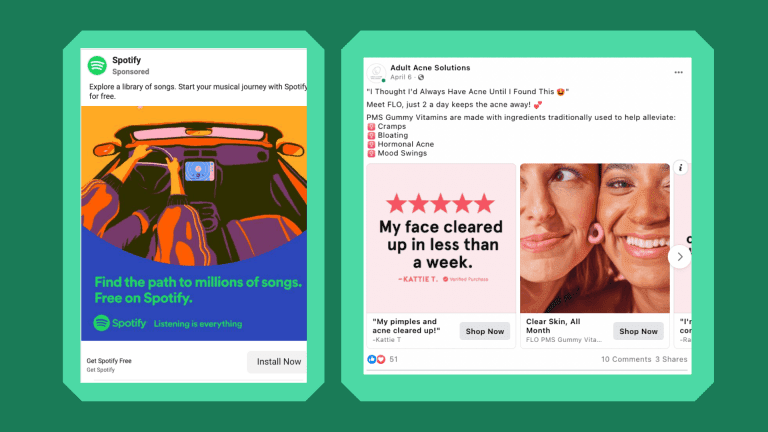
Good ad images usually have:
- Clear product or service photo
- Short headline
- Simple layout
Bad ad images often have:
- Large paragraphs of text
- Too many fonts
- Cluttered design
Checking designs with a facebook ads image checker helps identify these problems before the ad goes live.
3.4. When text is allowed
Text is still allowed on Facebook ad images, but it should be used carefully. Short headlines, logos, and small labels are usually fine. Long sentences covering the whole image should be avoided.
A facebook ads image checker is useful when you are not sure whether your design has too much text. Testing the image first can improve performance and prevent wasted budget.
4. How The Facebook Ads Image Checker Tool Works
Understanding how a facebook ads image checker works helps advertisers design better creatives and avoid delivery problems. This tool analyzes the amount of text on an image and shows whether the design follows Meta’s recommended ad guidelines.
4.1. What the facebook ads image checker does
A facebook ads image checker scans your ad image and estimates how much space is covered by text. The goal is to make sure the image focuses on visuals instead of large text blocks.
Even though Facebook no longer blocks ads based on text percentage alone, the system still prefers images with less text. That is why many advertisers use a facebook ads image checker before publishing campaigns.
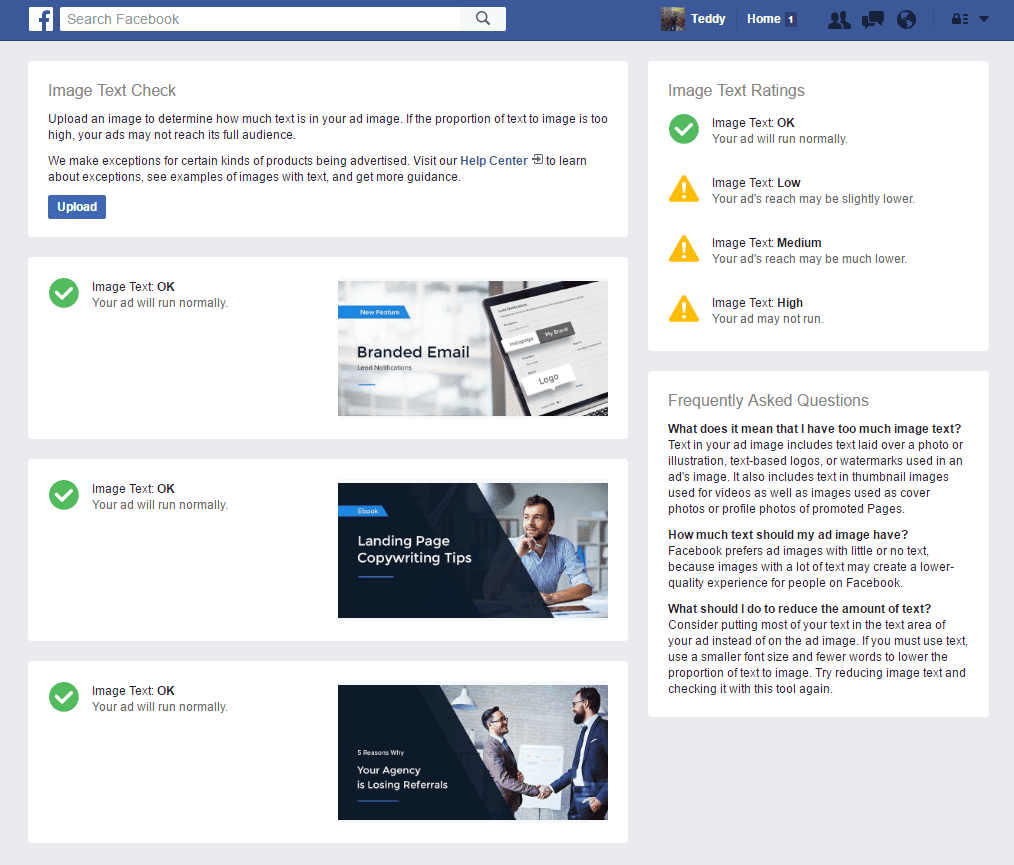
4.2. How text‑to‑image ratio is calculated
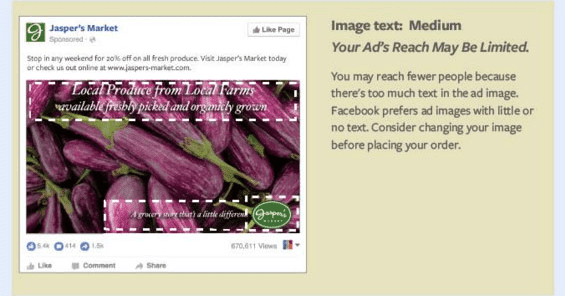
Most facebook ads image checker tools use a grid system to estimate the text‑to‑image ratio. The image is divided into small squares, and each square that contains text is counted.
If too many squares contain text, the image may be considered high text overlay. Ads with high text density often get lower reach or higher costs.
Using a facebook ads image checker makes it easier to keep the design balanced and compliant with recommended ad formats.
4.3. How to test your ad image
Testing an image with a facebook ads image checker usually takes only a few steps:
- Upload the image
- Review the text coverage
- Adjust the design if needed
- Test again before publishing
This simple process helps prevent problems after the campaign starts running.
4.4. Why using a checker saves ad cost
Ads with poor design often get lower engagement, which increases cost per click or cost per lead. A facebook ads image checker helps fix design issues before the ad goes live.
By improving the image first, advertisers can get better reach, better click rates, and lower advertising costs.
5. How to Check Facebook Ad Images Before Publishing
Before running any campaign, it is a good idea to review your creatives with a facebook ads image checker. Checking images early helps avoid rejection, limited delivery, or wasted budget.
5.1. Upload image to checker
Start by uploading your ad image to a facebook ads image checker tool. Most tools allow you to drag and drop the file or select it from your computer.
Once uploaded, the tool will analyze the text overlay automatically.
5.2. Use grid to estimate text coverage
Many facebook ads image checker tools show a grid over the image. Each square helps estimate how much text is visible.
If text appears in too many squares, the image may have high text density. In that case, reducing the amount of text can improve performance.
5.3. Adjust text size and position
If the checker shows too much text, try to:
- Reduce font size
- Move text to the corner
- Remove unnecessary words
- Use captions instead of image text
After editing, upload the image again to the facebook ads image checker to see if the result improves.
5.4. Test again before running ads
Always test the final version with a facebook ads image checker before launching the campaign. Small changes can make a big difference in how the ad performs.
Checking images before publishing is one of the easiest ways to avoid expensive mistakes.
6. Best Practices for Facebook Ad Image Text
Using the right amount of text is important for good ad performance. A facebook ads image checker helps, but following basic design rules makes the process easier.
6.1. Keep text short and clear
Short text works better than long sentences. Facebook users scroll quickly, so the message should be easy to understand in seconds. A facebook ads image checker often shows that images with less text perform better.
6.2. Use large but simple fonts
Fonts should be easy to read on mobile screens. Avoid decorative fonts that make the text harder to see. Simple, bold fonts usually give better results in Facebook ads.
6.3. Avoid too many words
Too many words can make the image look crowded. When this happens, engagement drops and delivery may decrease. Checking the design with a facebook ads image checker helps keep the text level balanced.
6.4. Place text in safe areas
Text should not cover important parts of the image, such as faces, products, or main objects. Placing text in the top or bottom area often works best for Facebook ads.
6.5. Use contrast for readability
Text should be easy to see against the background. Use strong contrast between text color and image color. Good readability improves engagement and helps the ad system rank the creative higher.
7. Common Mistakes That Cause Facebook Ad Image Rejection
Even today, bad design can cause ads to perform poorly or be rejected. A facebook ads image checker helps avoid these common mistakes.
- Too much text overlay: Images filled with text often get limited delivery. Even if the ad is approved, performance may be weak. Always check text density with a facebook ads image checker before publishing.
- Text covering important areas: Text should not hide the main subject of the image. Ads look unprofessional when the message blocks the visual. Clear images usually perform better.
- Low quality images: Blurry or pixelated images reduce trust. Facebook also recommends high‑resolution images for better results. Good quality visuals improve engagement and ad relevance.
- Wrong image size: Using the wrong size may cause cropping or layout problems. Follow Meta’s recommended image sizes for each ad format. Correct size + clean design = better performance.
- Using banned content: Ads can be rejected if the image contains restricted content, misleading text, or policy violations. Checking design and content before publishing helps avoid account problems.
8. Alternatives to Facebook Text Overlay Tool
Facebook removed the original text overlay grid tool, but advertisers still use other methods instead of the old system. A facebook ads image checker is still useful even without the official tool.
Third‑party image checker tools
Many websites offer tools similar to the old Facebook checker. These tools estimate text coverage and help improve ad design. They are helpful for marketers who create many ads every day.
Design tools with grid support
Some design platforms include grid layouts that make it easier to control text placement. Using grids while designing can reduce the need for fixing images later.
Manual checking method
You can also check text manually by asking:
- Is the text too large?
- Does it cover the main image?
- Can the message be shorter?
Even simple checks can improve ad quality.
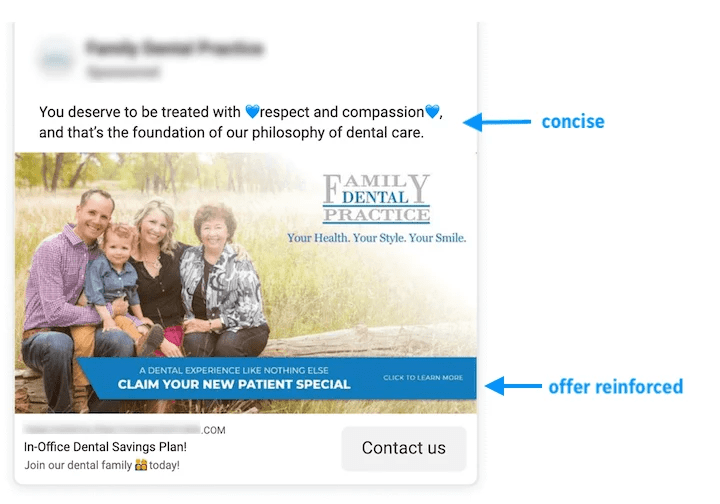
When you don’t need a checker
If the image contains only a logo or short headline, you may not need a facebook ads image checker. However, for promotional banners or text‑heavy ads, using a checker is still recommended.
9. FAQ about facebook ads image checker
Before creating ad images, many marketers want to understand how text overlay rules work and when to use a facebook ads image checker. The questions below explain the most important points.
9.1. Does Facebook still have the 20% text rule?
No. Facebook no longer uses the strict 20% rule, but images with less text still perform better. Many advertisers use a facebook ads image checker to follow recommended design guidelines.
9.2. How much text is allowed on Facebook ad images?
There is no exact limit now, but Meta recommends using minimal text. Too much text can reduce reach and increase ad cost.
9.3. How do I check text overlay on Facebook ads?
You can use a facebook ads image checker or similar tool to estimate text coverage before running the ad. This helps prevent delivery problems.
9.4. Why was the Facebook text overlay tool removed?
Facebook removed the old tool when the strict rule was discontinued. However, text overlay still affects performance, so using a facebook ads image checker is still helpful for advertisers.
Using a facebook ads image checker before publishing campaigns is a simple step that can make a big difference in ad performance. By keeping text overlay clean, following Meta guidelines, and testing images in advance, advertisers can improve reach, lower costs, and avoid unnecessary ad rejection. However, even with well‑designed creatives, campaigns can still fail if the advertising account is unstable or restricted.
That’s why many marketers and agencies choose to use professional ad account solutions. NEMI Ads provides reliable ads account rental services that help you run Facebook campaigns safely, reduce the risk of account bans, and scale advertising without interruption. If you want your Facebook ads to run smoothly and consistently, using a trusted ads account provider like NEMI Ads is a smart choice.