
If your business wants to advertise more professionally and manage campaigns in one place, learning how to create a Facebook Ads Manager account is a smart place to begin. This tool helps you control budgets, organize ad activity, track performance, and run ads across Facebook, Instagram, and other Meta placements with more clarity. In this guide, you will learn the key setup steps, account requirements, and best practices to build a stronger foundation for your advertising efforts.
1. What Is Facebook Ads Manager?
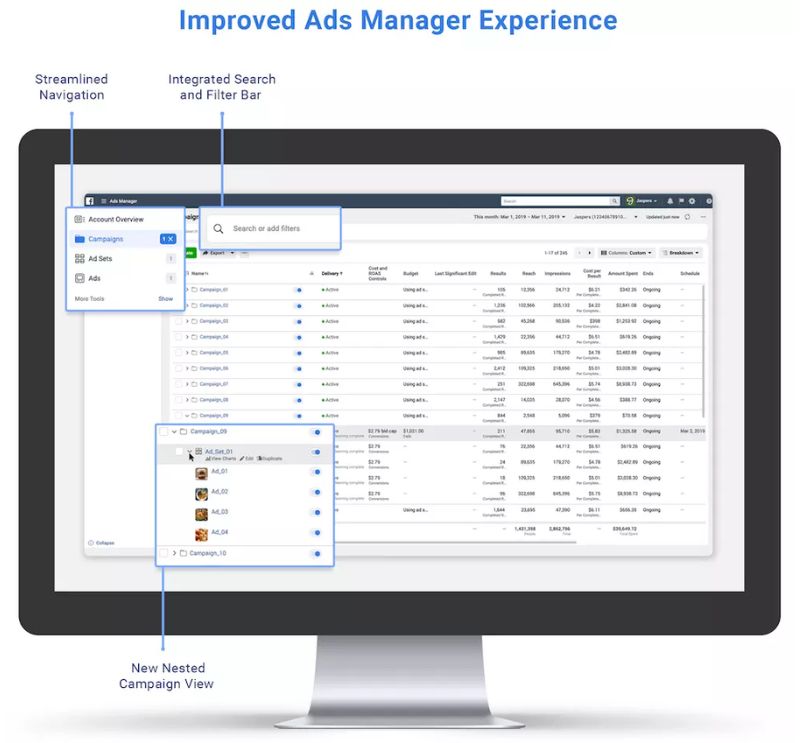
Facebook Ads Manager is Meta’s central tool for creating, managing, and tracking ads across Facebook, Instagram, Messenger, and other Meta placements. It allows businesses to build campaigns, choose audience targeting, control budgets, select placements, and monitor performance from one dashboard.
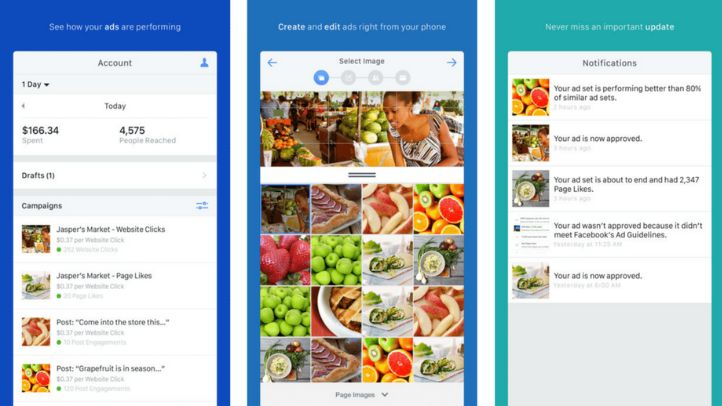
In simple terms, it works as an all-in-one platform for advertising. Businesses can launch new campaigns, review and edit existing ads, define specific target audiences, and access real-time reporting to measure results more effectively. This makes Ads Manager useful for brands of different sizes, including those who are still learning what is ads manager on Facebook and how a Facebook Ads Manager account supports campaign management.
2. Why Businesses Need a Facebook Ads Manager Account
A Facebook Ads Manager account gives businesses one place to create campaigns, manage budgets, control placements, and track results across Meta technologies. It is designed to help advertisers run ads more easily while reaching large audiences on Facebook, Instagram, Messenger, WhatsApp, and Audience Network.
This tool is useful for several reasons:
- It helps businesses reach a large audience across Meta platforms.
- The interface is centralized and easier to manage from one dashboard.
- A website is not always required to start promoting a business.
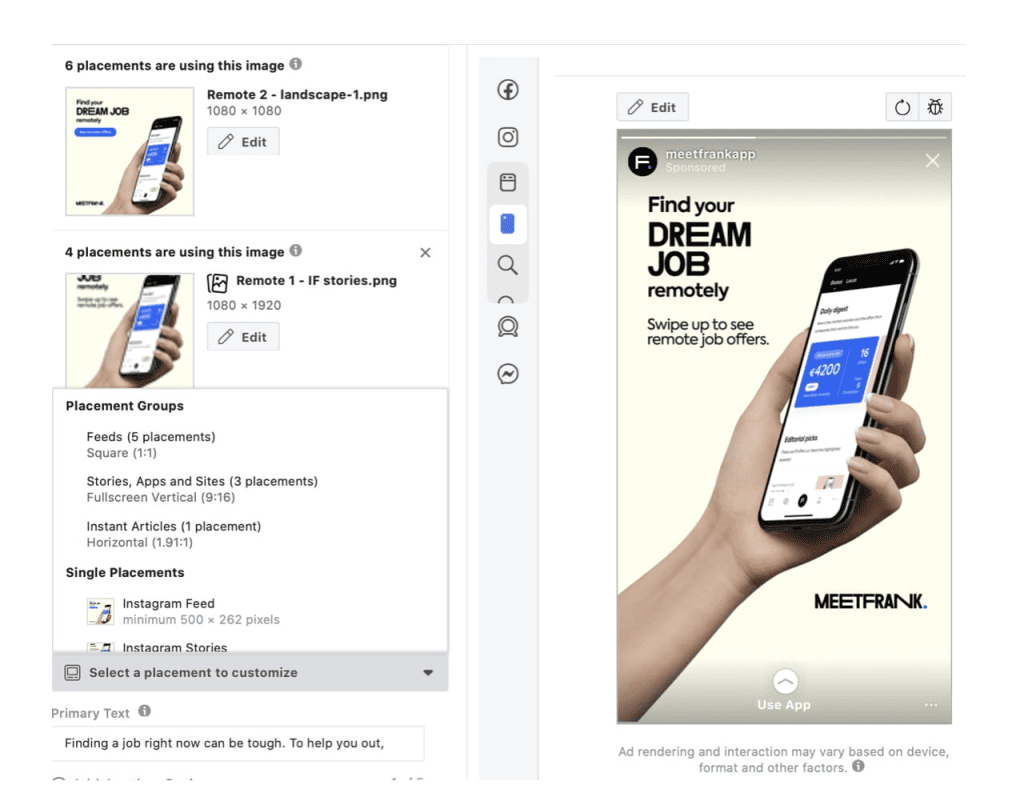
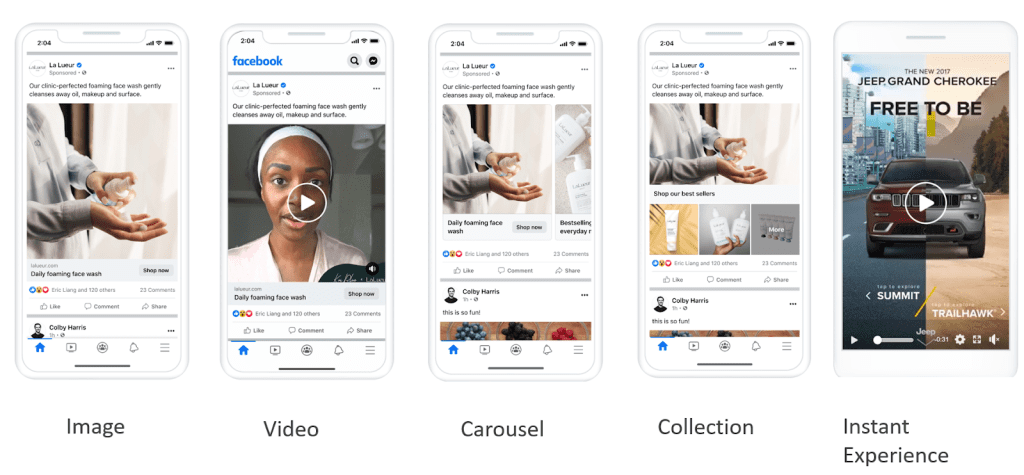
- It supports different advertising methods, objectives, and placements.
- Businesses can control budgets and use competitive ad delivery options.
- Ads Manager supports campaign creation, editing, and real-time performance tracking in one place.
3. Requirements Before Creating a Facebook Ads Manager Account
Before you create a Facebook Ads Manager account, a few basic requirements need to be ready. These essentials help ensure a smoother setup process and make it easier to start managing campaigns in the right way.
- A Facebook Page to represent your business and run ads from a valid brand presence.
- A Meta Business Manager account, where you manage business assets and create your ad account.
- A valid payment method, such as a credit card, debit card, PayPal, or other supported option.
Having these elements prepared in advance makes it easier to understand what is ads manager on Facebook and move forward with the account setup process more efficiently.
4. Creating Your First Facebook Ad in Ads Manager
At this stage, you should be able to access Facebook Ads Manager and complete the account settings that match your business needs.
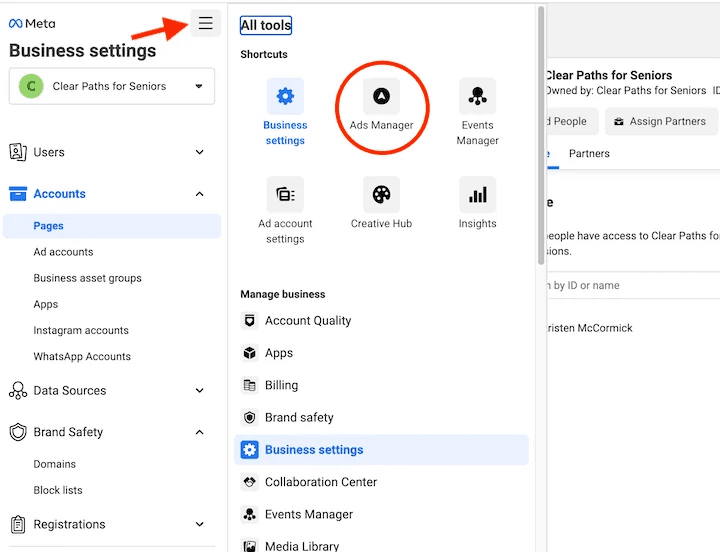
From the Facebook Ads Manager dashboard, click the three-line menu in the top left corner and choose Ads Manager from the Advertise column.
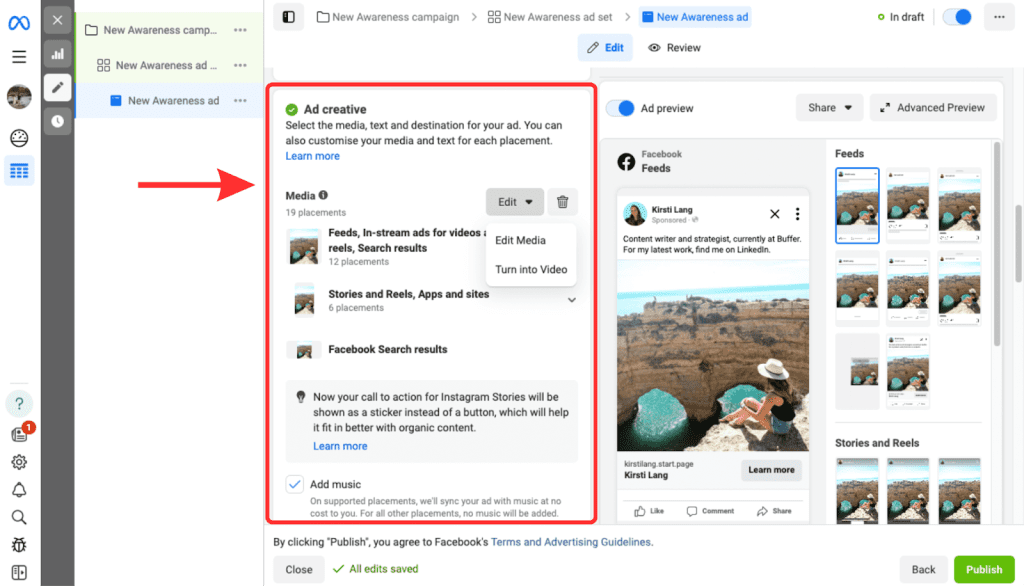
Next, click the green Create button on the home screen to start building your first Facebook ad campaign. The system will then guide you through the next setup steps, including targeting details, budget, and ad content, so you can complete the campaign creation process more easily.
You can also click Switch Guided Creation in the top right corner. This option walks you through each step and makes it easier to create your first ad.
5. Best Practices for Managing Your Facebook Ads Manager Account
5.1. Protecting Your Ad Account
Protecting your Facebook Ads Manager account is essential for stable campaign management. Start by enabling two-factor authentication, using strong passwords, and monitoring login activity regularly to detect unusual access early. Meta also allows businesses to manage people and assign asset access by role, which helps reduce unnecessary risk and keeps account control more secure.
It is also a good practice to review permissions regularly and remove access that is no longer needed. Keeping account access limited to the right team members helps protect business assets and supports smoother long-term ad management.
5.2. Optimizing Ad Campaigns
Optimizing ad campaigns starts with better targeting, smarter budget control, and consistent testing. You can improve performance by using Custom Audiences, Lookalike Audiences, and Saved Audiences to reach people who are more relevant to your offer. It is also useful to monitor spending closely and choose a budget setup that gives the system more flexibility based on campaign activity.
A/B testing is also important when refining performance. Test different creatives, headlines, or calls to action, but change only one element at a time so the results are easier to evaluate. It is also best to avoid making edits too quickly during the learning phase, because ad sets may be less stable and need time before performance can be judged more accurately.
5.3. Monitoring and Reporting
Monitoring and reporting help you understand whether your campaigns are performing as expected. Review key metrics such as cost per result, reach, and engagement on a regular basis, then compare results over time to spot trends and make better adjustments. Meta Ads Manager also provides up-to-date performance data, which makes ongoing evaluation easier.
You can also create custom reports and schedule them to be sent automatically, so important data is easier to track without checking manually every day. In addition, breakdown tools let you analyze performance by age, gender, location, device, and even time of day, which helps you see how different audience segments respond to your ads.
6. Using a Trusted Ad Account Provider – NEMI ADS
For businesses that need a more stable account solution, NEMI ADS can be a practical option. On its official site, NEMI ADS presents itself as an ad account rental provider, with services focused on Facebook, Google, and TikTok advertising accounts.
This can be helpful for advertisers who do not want to handle account-related issues on their own. Instead of providing campaign execution, NEMI ADS mainly positions its service around renting advertising accounts for businesses that want a smoother setup process or need support related to account usage.
This may also be relevant for users learning how to create a Facebook Ads Manager account or looking for a guided way to create Facebook ad manager account access before managing campaigns by themselves.
If your business prefers renting ad accounts rather than managing account setup and stability on its own, NEMI ADS may be a practical option depending on your campaign needs and budget.
7. FAQs About How to Create a Facebook Ads Manager Account
7.1. Is Facebook Ads Manager free to create?
Yes. Creating and using Meta Ads Manager does not have a setup fee. You only pay when your ads run and spend is charged to your payment method. Meta also notes that new businesses usually begin with an ad account creation limit of one until a confirmed payment is processed.
7.2. How long does it take to set up a Facebook Ads Manager account?
The setup itself can be done quite quickly once you have the basics ready, such as a Facebook Page, payment method, and business details. Meta’s account overview setup flow includes adding a payment method, creating or connecting a Page, and verifying your business email, so the actual time depends on how prepared you are. In practice, setup often takes a few minutes, but any missing information can make it take longer.
7.3. Can I create multiple ad accounts in Facebook Ads Manager?
Yes, but there are limits. Meta says businesses usually start with an ad account creation limit of one, and that limit can increase over time based on factors such as payment history. Meta also states that one person can manage up to 25 ad accounts, while a new business portfolio can only create one ad account at first and may later increase to three or more as eligibility changes.
Once you understand how to create a Facebook Ads Manager account, the next step is using it the right way to keep campaigns organized, secure, and easier to optimize over time. A solid account setup can make ad management smoother and give your business a better foundation for long-term growth. If you need a more stable account solution, explore NEMI ADS to find an option that fits your advertising needs.