
If you want to reach the right audience, control your budget, and turn attention into results, learning how to create Facebook Ads is a smart place to start. With Meta Ads Manager, even beginners can build campaigns, choose clear objectives, target specific users, and track performance in one place. This guide walks you through the full process in a simple way, so you can launch with more confidence and make better decisions from day one.
1. What Are Facebook Ads and How They Work
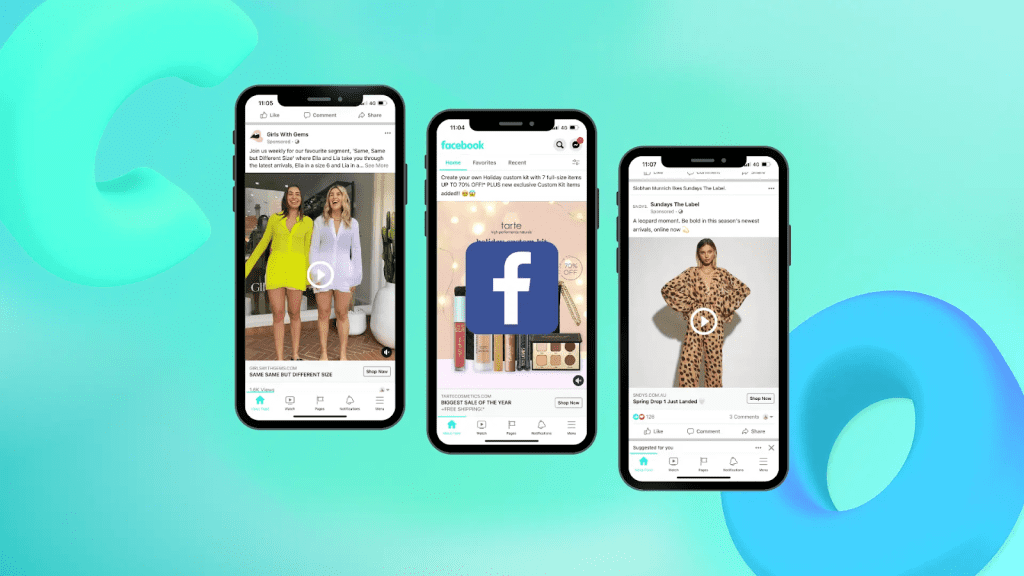
Facebook Ads are paid promotions that help businesses reach people across Facebook, Instagram, Messenger, and other Meta placements. Through Ads Manager, advertisers can create campaigns, choose an objective, define an audience, set a budget, and decide where ads will appear.
In simple terms, the system delivers ads to users based on campaign settings such as targeting, placements, and business goals. This makes it easier for brands to increase visibility, attract potential customers, and measure results in real time. It also gives businesses a practical way to learn how to run Facebook Ads more effectively through one central platform.
2. Key Benefits of Facebook Advertising
Facebook advertising offers more than simple promotion. It gives businesses the tools to reach the right people, control spending, track results, and reconnect with interested users more effectively.
2.1. Reach Your Ideal Customers
Facebook advertising helps businesses connect with people who are more likely to be interested in their products or services. Advertisers can define audiences based on factors such as location, age, interests, and online behavior, which makes targeting more precise and relevant.
2.2. Cost-Effective Audience Targeting
One major advantage is that businesses do not need a large budget to get started. Campaigns can begin with a small spend, making it easier to test different messages, audiences, and formats before increasing investment based on results.
2.3. Access Real-Time Performance Data
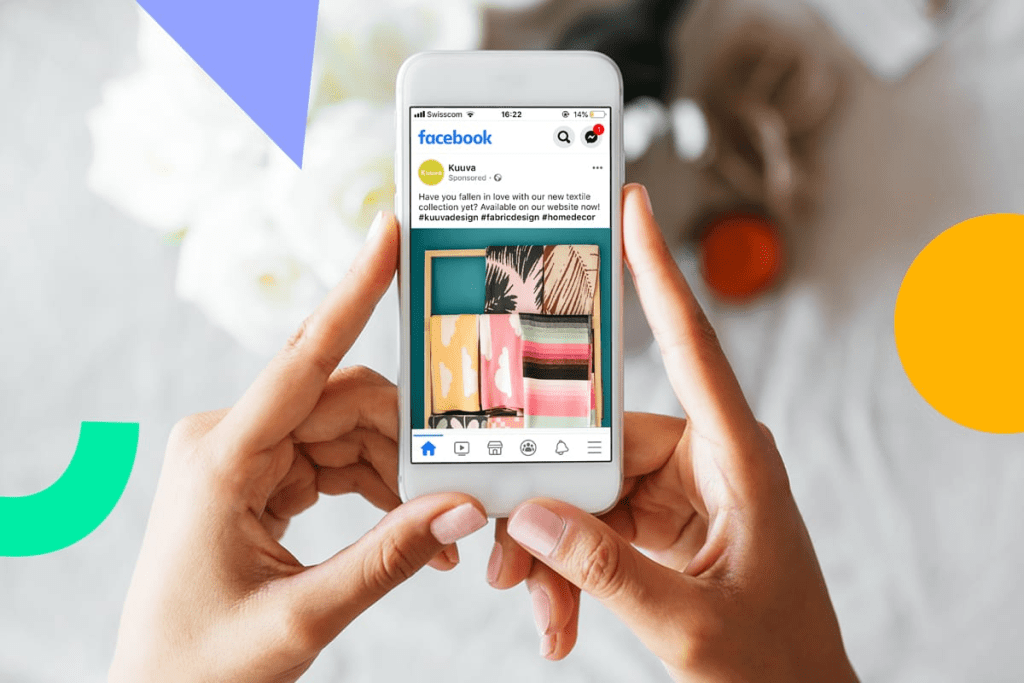
Another benefit is the ability to monitor campaign performance through live reporting tools. Businesses can track reach, clicks, conversions, and other metrics, which helps them understand what is working and improve campaigns more efficiently over time.
2.4. Powerful Remarketing Capabilities
Facebook advertising also supports remarketing by allowing businesses to reach people who have already visited their website or interacted with their brand. This makes it easier to re-engage interested users and improve the chance of conversion.
3. Requirements Before Creating Facebook Ads
Before you start, make sure the basic setup is ready. This helps you manage campaigns smoothly and supports a better process for how to create Facebook Ads.
- A Meta Business Manager account to manage business assets in one place
- A Facebook Page or proper Page access to publish ads from your business presence
- A Facebook ad account set up with the correct time zone and currency
- A valid payment method such as a credit card, debit card, or PayPal
- Strong ad creatives including images, videos, copy, and CTA that follow Meta’s ad policies
4. Step-by-Step Guide to Create Facebook Ads
To create Facebook Ads effectively, you need to follow a clear setup process. The steps below show how to create Facebook Ads step by step from setup to publishing.
4.1. Step 1: Open Facebook Ads Manager
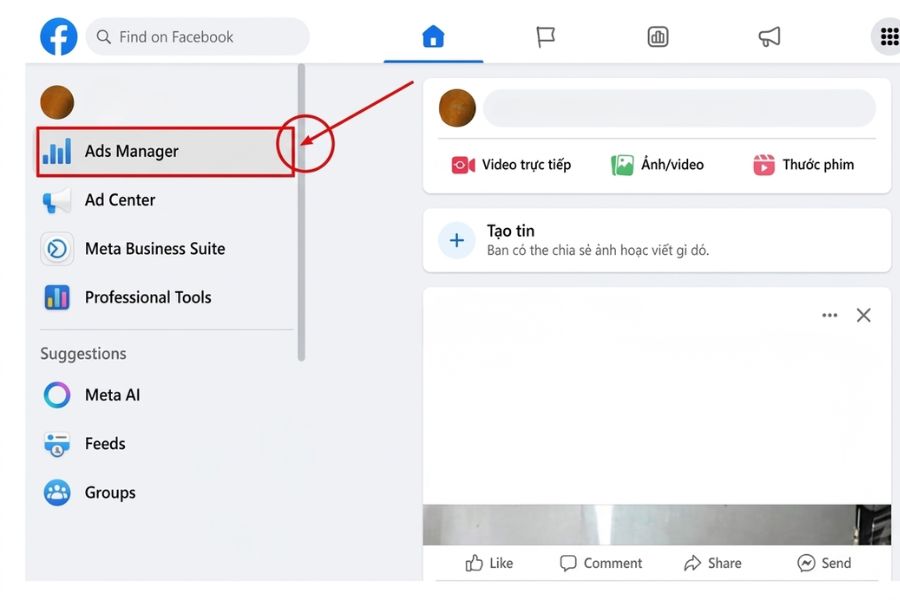
Start by going to Meta Ads Manager, the main tool used to create and manage campaigns. You can access it from your Facebook business tools and click Create to begin setting up a new ad.
4.2. Step 2: Choose Your Campaign Objective
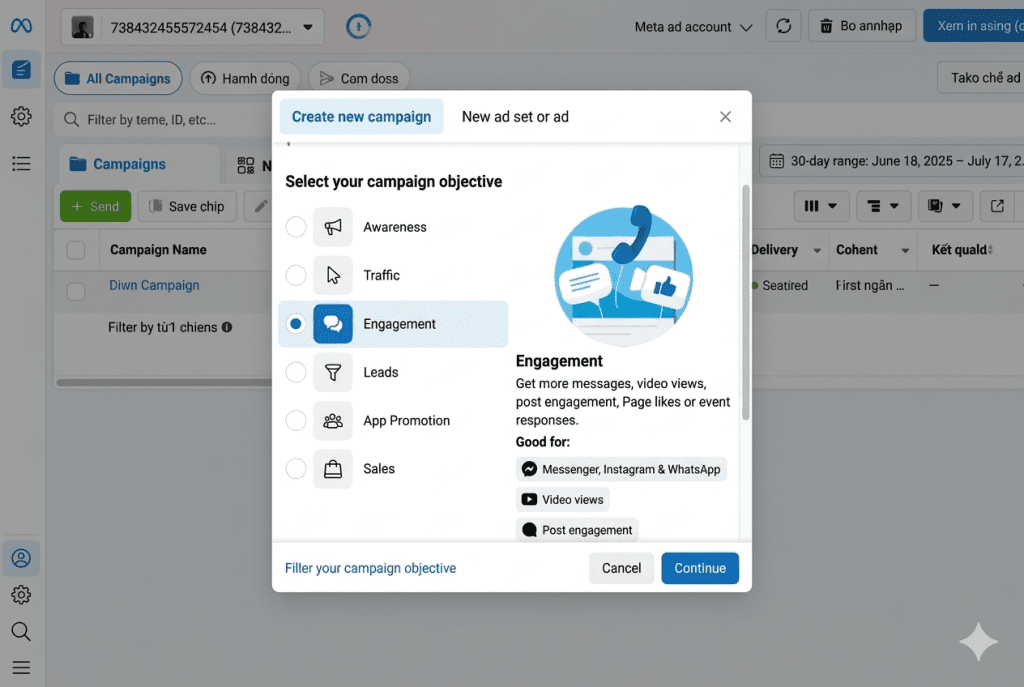
Next, select the goal that matches what you want to achieve. Meta offers objectives such as awareness, traffic, engagement, leads, app promotion, and sales, and this choice guides how your ad will be delivered.
4.3. Step 3: Define Your Target Audience
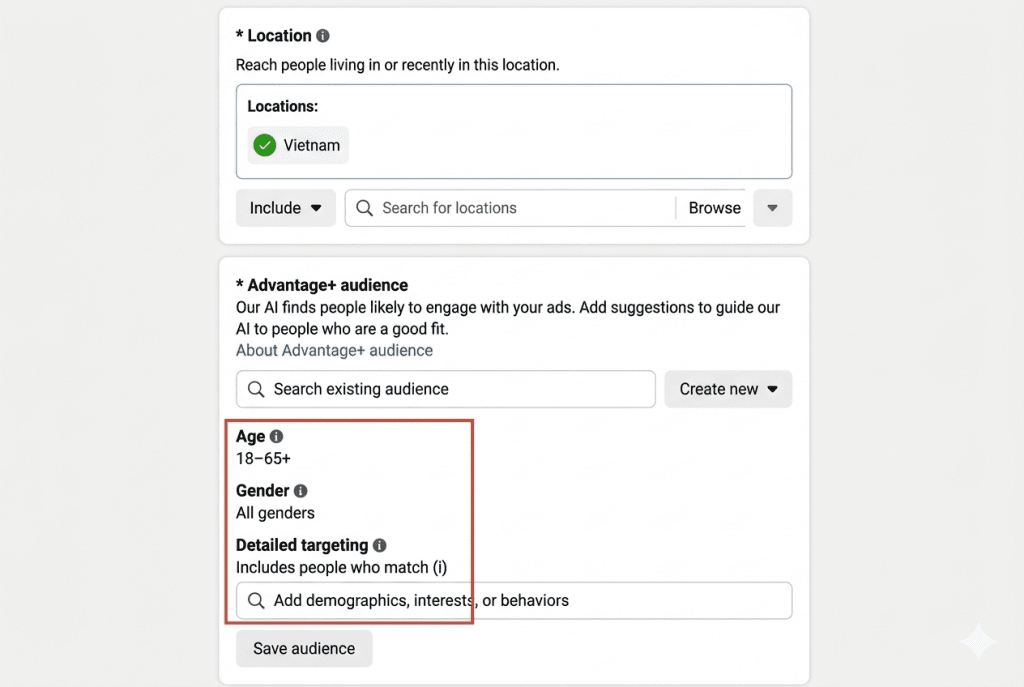
After that, choose who should see your ad. You can set targeting based on location, age, gender, interests, or behaviors so your campaign reaches the most relevant people.
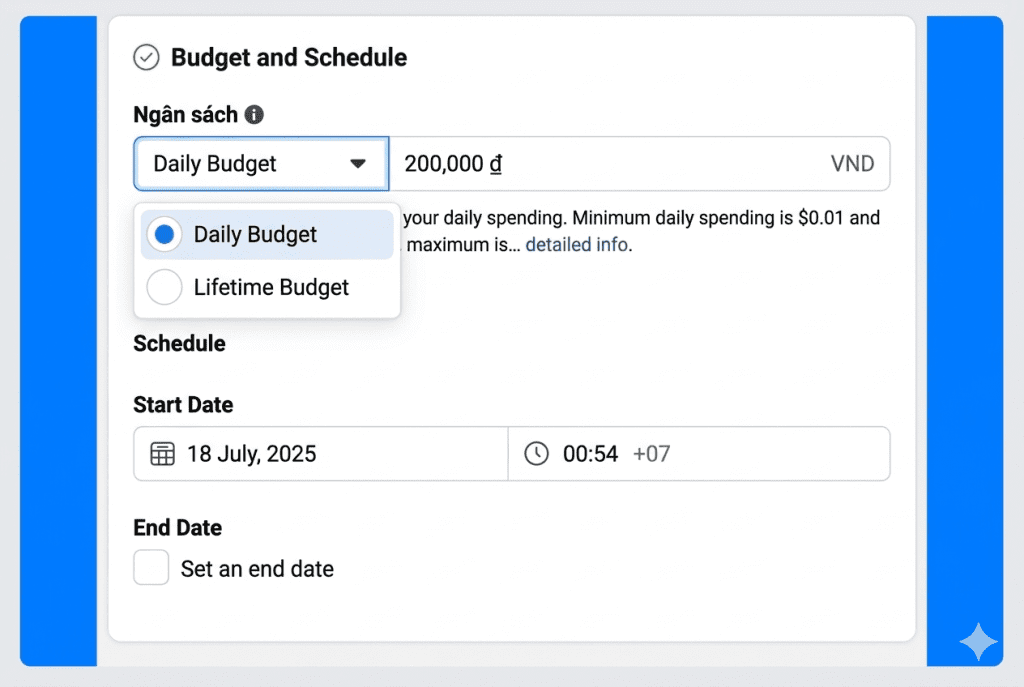
4.4. Step 4: Set Budget and Schedule
Then, decide how much you want to spend and how long the campaign should run. You can choose a daily or lifetime budget and set a start date and end date based on your plan.
4.5. Step 5: Choose Ad Placements
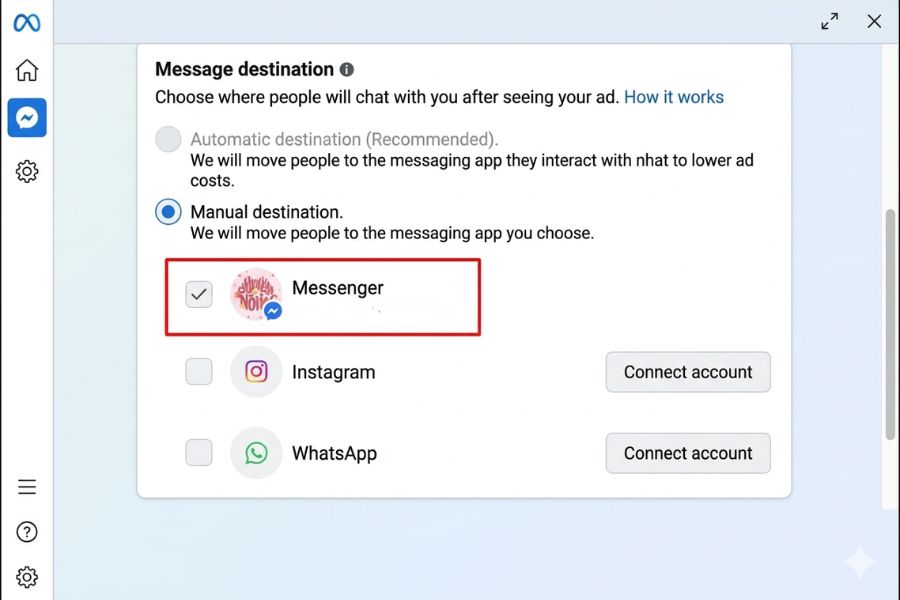
Now select where your ads will appear. Meta allows placements across Facebook, Instagram, Messenger, WhatsApp, and Audience Network, and you can choose automatic or manual placements depending on your strategy.
4.6. Step 6: Create Your Ad Creative
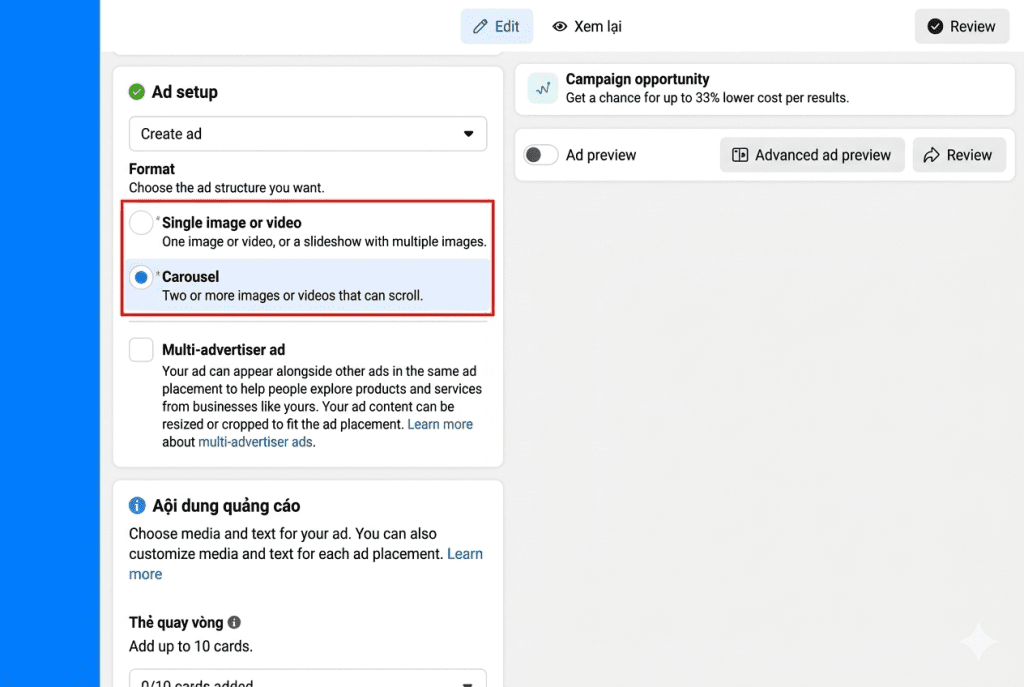
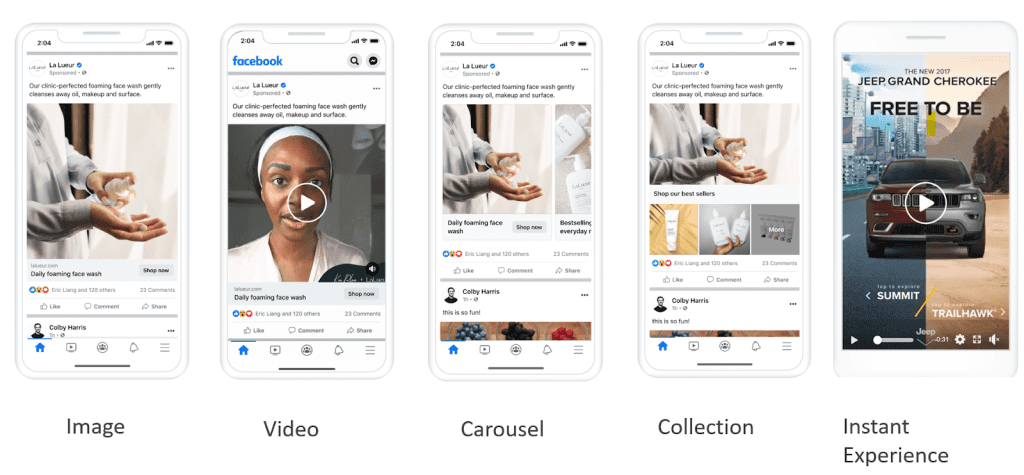
At this stage, build the ad itself by adding your image, video, headline, text, and call to action. You can create a new ad or use an existing post, depending on the format you want to run.
4.7. Step 7: Review and Publish Your Ads
Before publishing, review all campaign settings carefully to make sure everything is correct. Once confirmed, submit the ad for review, and Meta will process it before delivery begins.
There are several key metrics that you need to pay attention to in order to evaluate performance and improve your results effectively:
| Metric | Definition | Meaning / Use |
| Reach | Number of unique people who saw your ad at least once. | Measures how widely your ad is seen. Useful for brand awareness. |
| Impressions | Total number of times your ad was shown. | Shows ad frequency. High impressions with low CPM can indicate efficient delivery. |
| Clicks | Number of times users clicked on your ad. | Reflects user interest and interaction with the ad. |
| CTR | Percentage of clicks compared to impressions. | Indicates how attractive and relevant your ad is. |
| Conversions | Number of desired actions taken after clicking the ad. | Measures final campaign effectiveness, such as purchases or sign-ups. |
| CPO | Average cost to generate one order. | Helps evaluate whether your ad spend is profitable. |
| ROAS | Revenue generated compared to ad spend. | Shows if your campaign is making a profit. |
5. Tips to Create High-Performing Facebook Ads
Knowing how to run Facebook Ads effectively is not only about launching a campaign. The tips below help improve ad quality, control costs, and increase performance over time.
5.1. Run Ads During Peak Hours
Ad scheduling can help improve delivery and give you more control over when your campaign runs. Meta allows advertisers to set start times, end times, and specific schedules in Ads Manager, so ads can appear during the hours that matter most to the business.
However, running ads only in so-called peak hours does not always lower costs. During highly competitive time slots, metrics such as CPC, CPA, bid price, and CPM may increase because more advertisers are entering the same auction. For this reason, the best schedule should be based on testing and real campaign data rather than fixed assumptions.
5.2. Optimize Facebook Ad Images
Strong visuals can improve ad performance, so image quality and format matter. Meta recommends using high-resolution images and the correct aspect ratios for each placement to make creatives look clear and professional across devices.
5.3. Promote Posts with Facebook Ads
Boosting or promoting an existing post is a simple option for advertisers who want to increase reach without building a campaign from scratch. This method can help businesses turn organic content into paid promotion and get in front of a wider audience.
5.4. Prioritize High-Engagement Posts
Posts that already perform well organically can be strong candidates for paid promotion. Using existing posts in Meta Ads Manager also helps advertisers keep engagement on one post instead of splitting results across multiple versions.
5.5. Segment Your Advertising Campaigns
Dividing your campaign into smaller ad sets can make testing easier and give you better control over targeting, creatives, and performance. In Meta Ads Manager, campaigns are structured into campaign, ad set, and ad levels, which supports more precise optimization.
6. FAQs About How to Create Facebook Ads
6.1. How much does it cost to run Facebook Ads?
The cost depends on your budget, audience, bidding, and campaign objective. Meta does not set one fixed price, and advertisers can control spend by using daily or lifetime budgets. Meta also recommends starting with at least $5 to begin testing performance. For businesses learning how to create Facebook Ads, starting small is a practical way to understand costs before scaling
6.2. Can beginners create Facebook Ads easily?
Yes. Beginners can create ads in Meta Ads Manager by following the setup process step by step. The platform allows users to choose an objective, define an audience, set a budget, and publish ads in one place, making it easier to learn how to create Facebook Ads step by step even without advanced experience.
6.3. How long does it take for ads to be approved?
Most ads are reviewed within 24 hours, although some may take longer depending on the content and review volume. Meta states that the review process starts automatically before the ad begins running, and ads can be reviewed again later if needed. This is useful to know when planning how to post Facebook Ads and scheduling campaign launch times.
Now that you understand how to create Facebook Ads, you can start building campaigns with a clearer strategy and more confidence. The key is to test, monitor results, and improve each step over time to get better performance. If you want to grow faster with a smarter advertising approach, explore NEMI ADS and find the right support for your next campaign.