
Facebook ads lead is one of the fastest ways for businesses to capture potential customers directly on Facebook. But what exactly are Lead Ads, and how do you run them the right way to drive strong results? In this guide, you’ll learn the essentials from how the format works to the key steps that can improve lead quality and campaign performance. If you want a clear and practical overview before launching, this article will provide the direction you need.
1. What is a Facebook ads lead?
What is a Facebook ads lead?
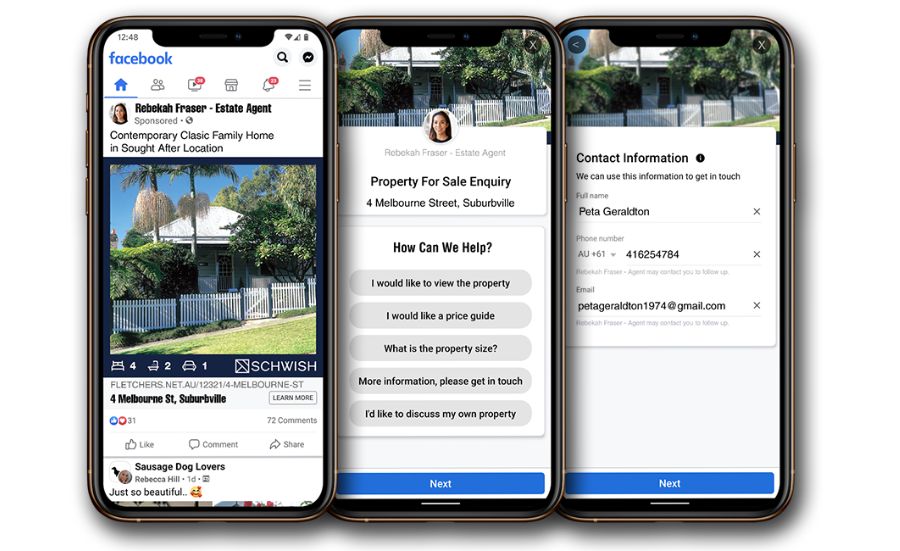
A Facebook Ads lead is a Lead Ads format that can appear in Facebook News Feed and Stories, and it can also run on Instagram.
With this format, the advertiser can collect personal contact details through an in-app form. Users can submit their information without leaving the platform, which keeps the flow quick and simple.
2. Why use Facebook lead ads?
Facebook lead ads can feel like a fresh experience for both brands and audiences. It keeps the action inside Facebook, so the flow stays simple and fast.
2.1 Facebook Lead Ads User Perspective
With Lead Ads, people can share details on the same platform without being sent to another page. This reduces the friction that often happens when ads push users away from what they are doing.
When someone taps the CTA, Facebook ads lead forms can appear with some fields already filled using the user’s saved Facebook profile data. The format is also mobile-friendly because Facebook is built for heavy phone usage. So users on different devices can still view the ad and complete the form with ease.
2.2 Facebook Lead Ads Advertiser Perspective
For Facebook ads for lead generation, this is a practical way to collect prospect data without creating a new landing page or adding an extra conversion link. Once the campaign is set up, submissions can be pulled automatically. In some cases, the data can also be connected to a CRM.
It also supports audience filtering, such as interests and location. This helps you reach people who are more likely to match your product or service.
3. How Facebook Lead Ads Work: Setup and User Flow
To run a Facebook ad lead, you first create a campaign in Facebook Ads Manager. From there, you can adjust key settings, upload media, and build multiple ad variations. This helps keep creatives flexible, control spend, and still reach the right audience.
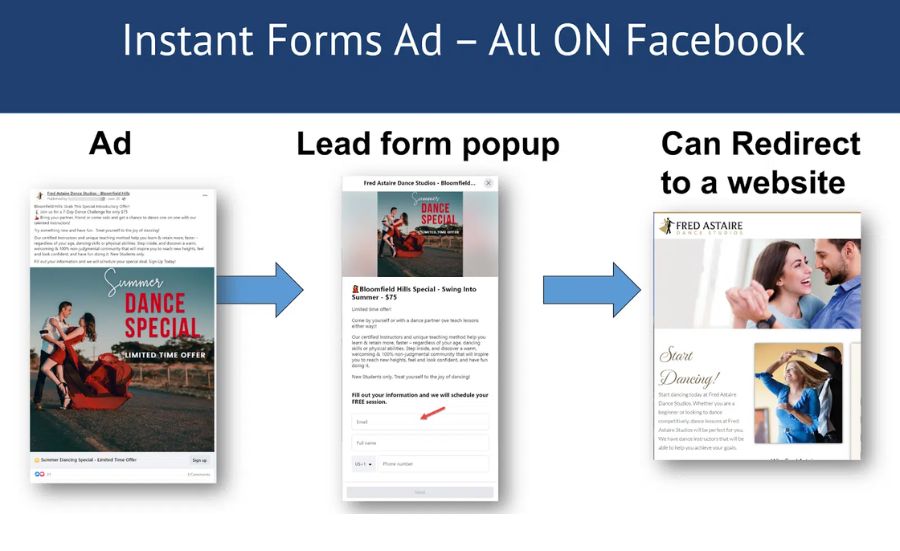
In many cases, Facebook ads lead works best when tied to a discount or promotion. If your goal is product awareness, the offer can be a coupon for that item. The user taps the ad and submits a form to receive the code, all without leaving Facebook. Then Facebook delivers the coupon through a thank-you message or by email, based on your setup. This is the Facebook ads lead form flow, and both sides benefit.
A key advantage of Facebook ads lead is that the form appears instantly on Facebook. Users can fill it out in place, which can improve the conversion rate. If you enable it, the data can also be sent to your CRM.
4. How to Set Up Facebook Lead Ads: A Step-by-Step Guide
After understanding what Facebook ads lead is, many businesses use this feature to reach the right audience. Below is a clear setup flow you can follow.
4.1 Step 1: Open Ads Manager
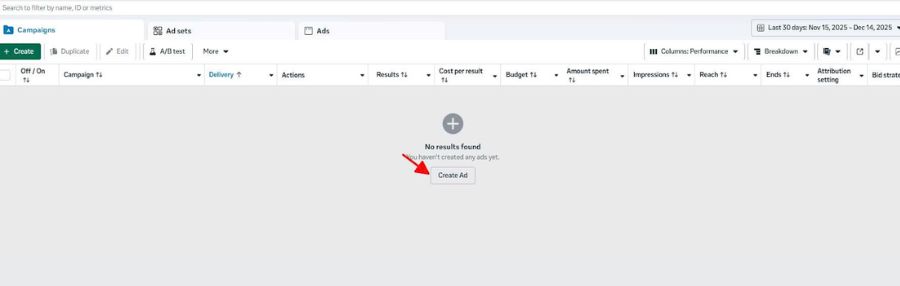
Go to Ads Manager (you can also access it via https://www.facebook.com/pe) and click Create to start a new campaign.
4.2 Step 2: Choose Campaign Objective
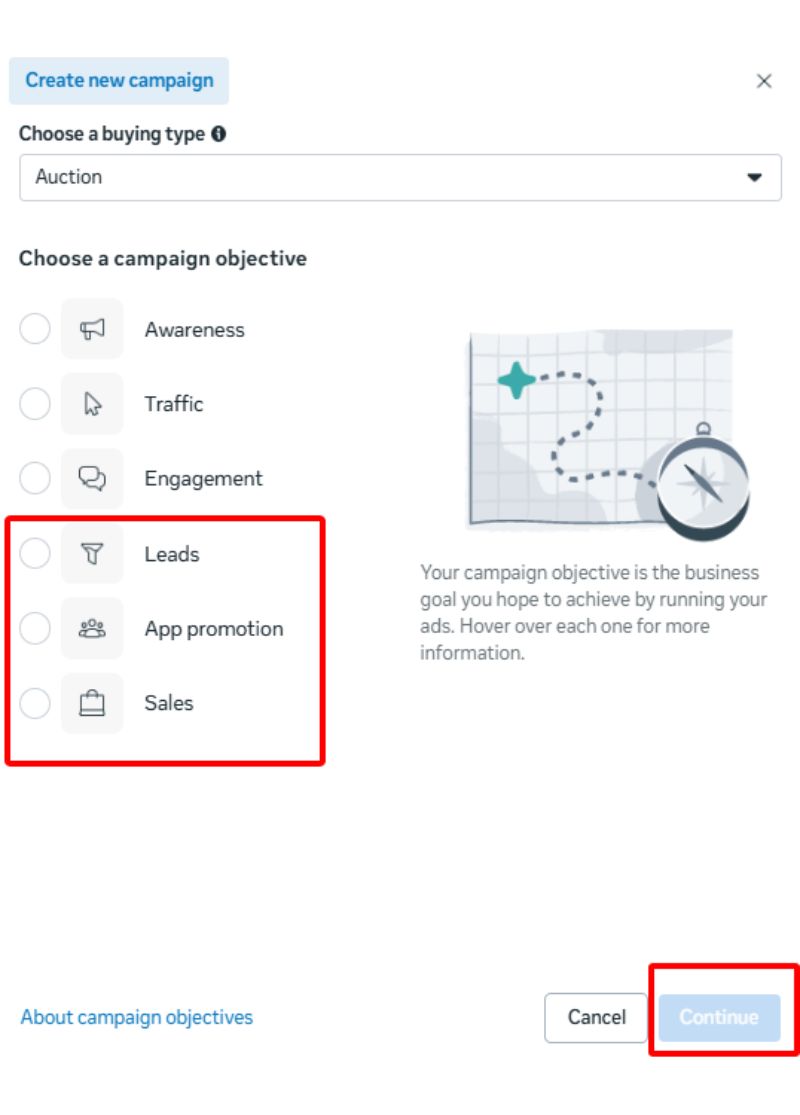
When selecting the objective, choose Leads. This is the required option for Facebook ads lead generation campaigns.
4.3 Step 3: Name Your Campaign
Enter a campaign name so you can tell it apart from other campaigns and avoid confusion later.
If you are new, you can click Next to continue. If you want more control, you can select A/B Test to run testing, or use Advantage Campaign Budget to let Facebook distribute budget across ad sets for better results, depending on your objective and bidding approach.

4.4 Step 4: Set Up Ad Group for Lead Ads
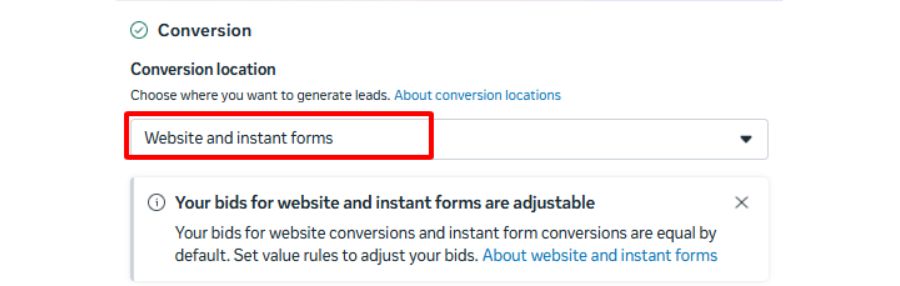
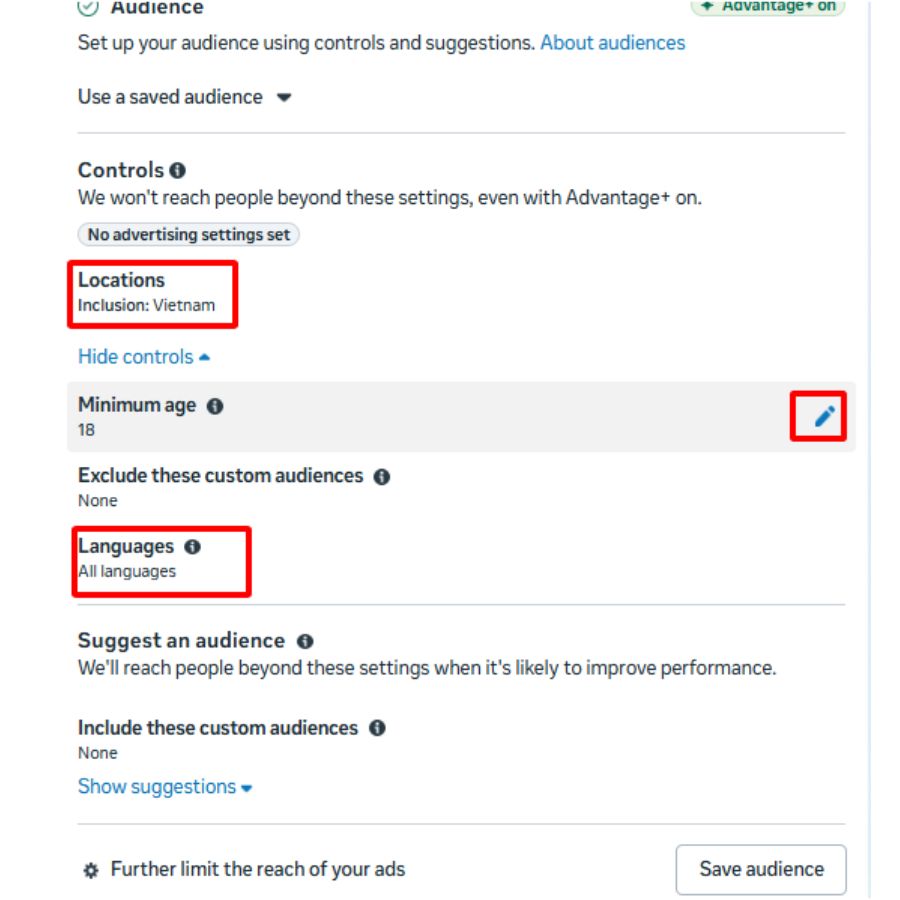
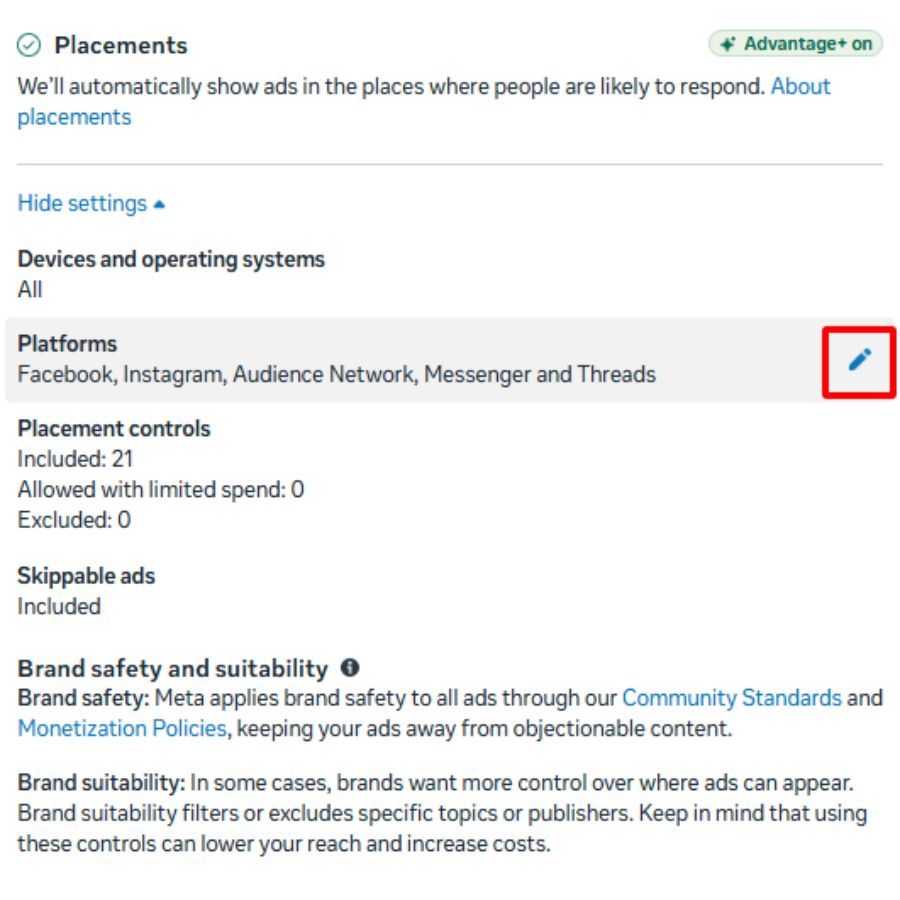
In this setup section, you work through four key areas: conversion location, budget, audience, and placements.
- Conversion location: Choose based on your goal. If you want users to submit details through a form, select Instant Forms (this is the Facebook Ads lead form option).
- Budget: Set your spend based on the total amount you want to invest in the campaign. Facebook may show a default daily budget (for example, 400,000 VND/day).
- Audience: Configure targeting based on your ideal customer demographics.
- Placements: You can let Facebook choose placements automatically, or select Manual placements to pick specific placements you want.

4.5 Step 5: Set Up Ad Content
Here, you create what people will see. Go to the ad content section and write clear call-to-action lines to encourage clicks.
If you selected Instant Forms, scroll to the destination area and choose Create Form to build your Facebook ads lead forms. When everything is ready, click the blue Publish button to launch your campaign.

5. Benefits of Using Facebook Lead Ads
Businesses can reach the right audience, people who already show interest in their products, through Facebook ads. Beyond targeting, this format also offers several practical advantages, especially when utilizing dynamic Facebook ads to automatically deliver personalized content to the most relevant audience.
5.1 Simple and Effective Information Collection
With a lead ad, you can ask users to submit details through Facebook ads lead forms. People enter the requested information directly in the form and do not need to open another page. This makes data collection straightforward and efficient, while helping you capture the information you need
5.2 Fully Utilize Existing Customer Database
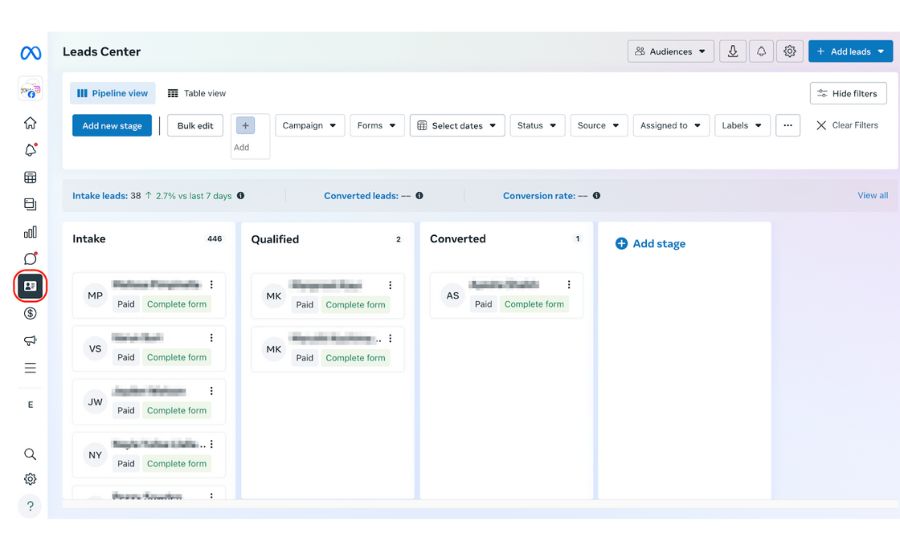
With an existing pool of potential customers, Facebook ads lead can continue to work over time. The ad delivery focuses on the audience you set, and the form collects details based on your chosen questions. This supports long-term use of your current prospect database.
5.3 Attract Customer Attention
When users see your ad, they may feel interested and tap the call-to-action button. They are willing to fill in the form, and they can review and edit their entries before confirming and sending. This makes the submission process feel more controlled and user-friendly, ultimately improving cost per action Facebook ads by driving higher-quality conversions at a lower cost.
5.4 Cost-Effective Business Strategy
When you understand how Facebook ads lead generation works, the cost per lead on Facebook can be lower. Pre-filled fields also make sign-up faster, so users can engage with your brand more quickly and with less effort.
6. Top Tips to Create High-Converting Facebook Lead Ads
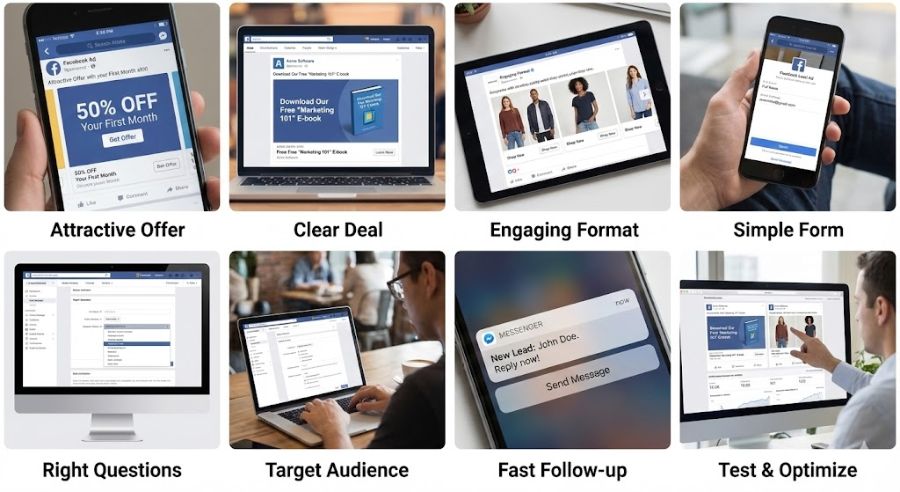
To improve conversion rates with Facebook ads leads, apply the tips below. Keep your message clear, your offer easy to understand, and your follow-up fast.
6.1 Offer Something Truly Attractive
People often respond well to promotions and discounts because they see a direct benefit. A strong incentive can make lead ads more appealing and increase form submissions.
6.2 Explain the Deal Clearly
Be specific about what users will receive. Mention your brand name while sharing the offer, and use strong visuals to highlight the product message. This helps users understand the value before they click.
6.3 Use Engaging Content and Formats
To help Facebook ads lead perform better, choose formats that hold attention. If you want to showcase multiple items, consider a carousel-style setup. Short videos can also support storytelling and improve brand recognition.
6.4 Keep the Form Simple
Many users have limited time, so a simple Facebook ads lead form can increase completion. Ask only core questions, and for each question, limit answers to about three or four options.
6.5 Ask the Right Questions
Create questions that match your product goal. This keeps responses relevant and helps you collect information that supports your next steps.
6.6 Target the Right Audience
Your targeting should match the product you are promoting. Focus on three key audience types: lookalike audience, people near you, and custom audience. This makes lead gen ads on Facebook more precise and improves lead quality.
6.7 Follow Up Quickly
Reach out as soon as possible to increase the chance of conversion. You can also use Facebook messaging tools to contact users faster and make communication easier.
6.8 Test and Optimize
You can only identify the best-performing approach through testing. Run experiments, compare results, and keep optimizing your Facebook ad lead based on what performs best.
7. FAQs about Facebook ads lead
7.1 How can I qualify leads from Facebook Lead Ads?
To qualify leads from Facebook Lead Ads, add a few key questions in your form to filter intent, such as budget, timeline, or level of interest. Sync leads with a CRM to track behavior and prioritize follow-ups, helping improve overall lead quality.
7.2 Can I run multiple Facebook Lead Ads campaigns simultaneously?
Yes, you can run multiple Facebook Lead Ads campaigns simultaneously, and doing so can help you test different audiences, creatives, and offers to maximize lead generation. By running A/B tests across various ad sets and tracking performance, you can identify which campaigns generate the most qualified leads, allowing for better budget allocation and campaign optimization.
7.3 Why does my Facebook ad lead campaign get leads but few actual sales?
A lead is not a sale. If the gap is large, your next step (call script, message sequence, or offer clarity) may be weak. Tighten your follow-up process and make sure the offer matches what the sales team can deliver.
We hope this article helped you understand what Facebook Lead Ads are and how to set them up effectively. With this Facebook feature, businesses can reach the right audience more easily and collect the information needed to support their business goals. If you want clearer planning and smoother execution, a Facebook Ads account with spend history can provide valuable insights into your campaign performance and help optimize future ads. NEMI Ads can help you apply the right approach from setup to follow-up. Start with a focused strategy, and let Facebook ads lead to support your next growth step.