
Carousel ads on facebook make it easy for brands to share more in one ad. You can display a series of images or videos that users can swipe through, keeping them engaged longer. This format helps tell stories, show product details, and inspire action in a simple way. Many businesses use it to boost reach and conversions. In this article, we’ll explore how to create effective carousel ads on facebook and why they deliver such strong marketing results.
1. What Are Carousel Ads on Facebook?
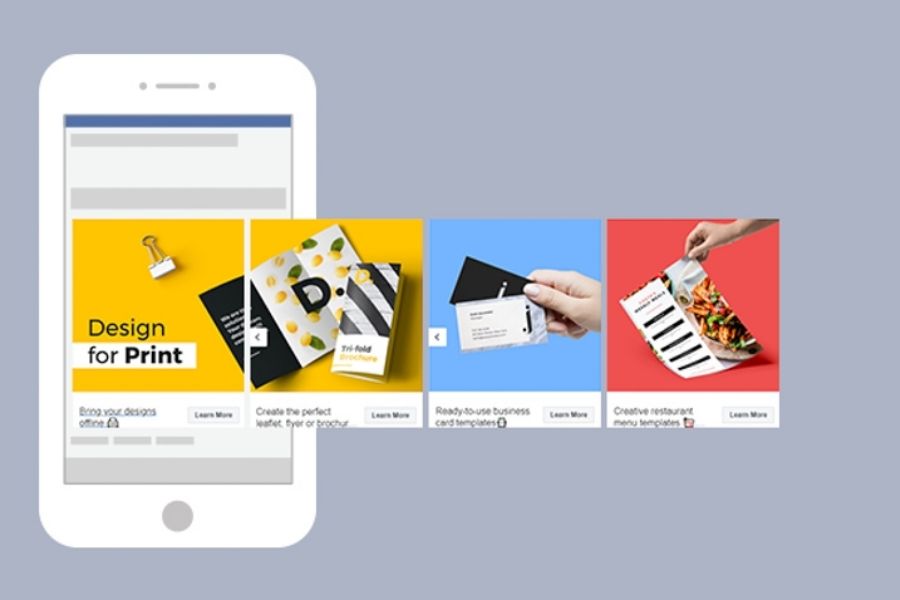
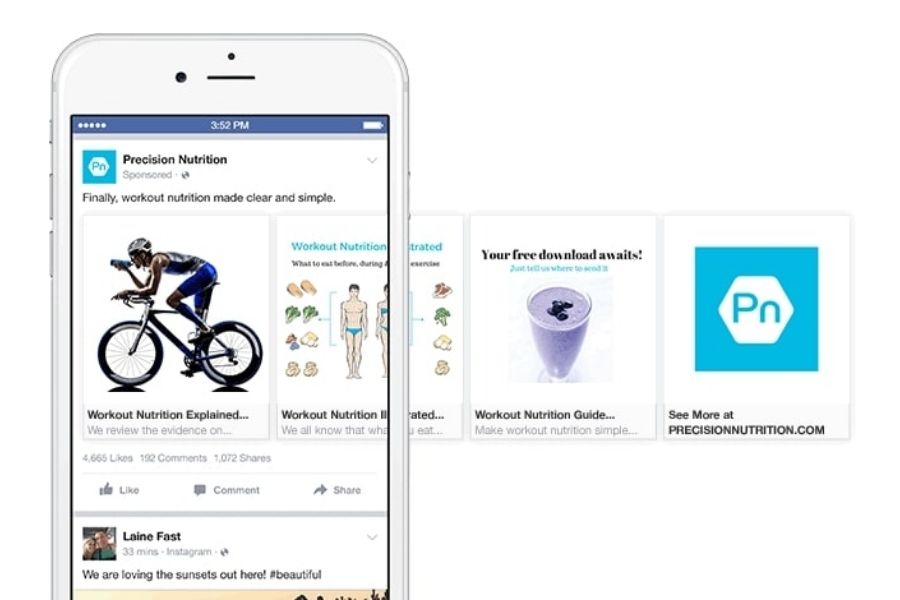
Carousel ads on Facebook let brands display several products or services in a single post. Each card shows one image, video, or link, and viewers can swipe or click to move through them. This motion keeps people engaged and encourages exploration.
With this format, businesses can tell short, clear stories. Each card adds a small part of the message, making it easy to follow. It’s simple, direct, and holds attention longer than a single static image.
Many marketers use Facebook ads multiple images or carousel Facebook ads to compare products or share offers. This setup helps audiences browse quickly and understand what’s being shown without feeling overloaded.
2. Benefits of Using Carousel Ads on Facebook
2.1 Save Advertising Costs
Carousel ads on Facebook help stretch your budget. One unit can showcase several offers in a single placement, so testing is cheaper. Many brands see a 30–50% drop in cost per conversion versus a single-image link ad. By tracking cost per action Facebook ads, you can ensure your spend is directed toward high-value clicks. Each card can drive to a site or an app page, so spend goes to clicks that matter. Use tight copy and clear calls to action to cut waste. With this ad style, you gain more results from the same media spend.
2.2 Increase Engagement for Posts
People can swipe or tap through each card. That motion pauses the scroll and invites action. Strong visuals and short lines boost click-through rate. This ad format presents choices without clutter, so viewers explore more. Engagement Facebook ads leverage this format to keep users engaged and drive higher interaction. Try Facebook ads multiple images, compare features side by side. You can also create storytelling sequences that guide users through each step with ease.
2.3 Higher Conversion Rates
Carousel ads on Facebook help businesses share more details than regular ads. You can use up to ten cards, each with its own image, headline, and call-to-action. This format lets you show different products, features, or deals in one ad. Shoppers understand your offer faster and feel more confident to act. The result is a shorter path from interest to purchase and higher conversion rates.
3. Key Specifications for Carousel Ads on Facebook
Use carousel ads on Facebook to build a scrollable unit with clear links and simple copy. Follow this checklist to set it up correctly and ensure smooth delivery.
- Cards: minimum 2, maximum 10 per ad. Each card in the carousel ad must have its own unique URL that directs users to a specific landing page.
- Assets: images in .jpg or .png; single file up to 30 MB. Supported video formats apply; one video file can be as large as 4 GB and as long as 240 minutes.
- Size & ratio: recommended resolution is at least 1080×1080 px with a 1:1 aspect ratio for every card in these ads
- Text limits: headline up to 40 characters; description up to 25 characters; primary text up to 125 characters.
- Image text rule: on-image copy should stay under 20% of the visual area.
4. When to Use Carousel Ads on Facebook
This advertising style works best when you want to show more in less space. It lets brands display products, share ideas, and reach past visitors in a simple way. The short, swipe-style format keeps people interested and helps them explore with ease. Below are the key moments to use this type of ad.
4.1 Showcasing Multiple Products (Facebook Ads Multiple Images)
Use carousel ads on Facebook when you want to feature several items in one unit. Each tile can spotlight a different SKU with its own link. Shoppers can browse quickly and jump to the right page. This makes discovery fast and reduces friction. With this format, you offer variety without clutter.
4.2 Telling a Brand Story
Turn a sequence of cards into a clear narrative. Start with the hook, then reveal benefits, and close with proof. Short captions and focused visuals keep readers moving. This layout helps you pace the message, one step at a time, from intro to action.
4.3 Explaining a Process with Carousel Facebook Ads
Break down a workflow into simple stages. Show step-by-step frames: overview, how it works, result, and next move. Each card can include a headline and a button. This format makes complex ideas easy to grasp in seconds.
4.4 Driving User Interaction
Motion invites taps and swipes. Pair bold imagery with direct calls to action. Lead to a landing page, a download, or a promo join. This creative format sustain attention longer than a single image and push users deeper into the journey.
4.5 Retargeting Existing Customers
Reconnect with people who viewed or added items to their cart. Serve relevant products, bundles, or limited-time offers. Personalize cards based on interests or past actions. This ad type brings shoppers back with timely reminders and clear paths to convert.
4. How to Create Carousel Ads on Facebook
Use carousel ads on facebook from your Page or in Ads Manager. Prepare images or videos, links, and short copy before you start.
4.1 Create from your Facebook Page
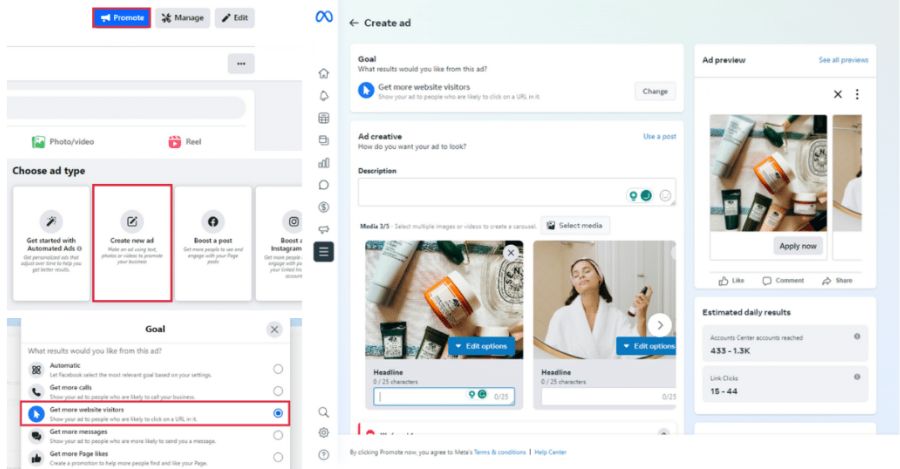
Step 1: Open the Page you manage.
Step 2: Click the Page promotion tool to start carousel ads on facebook.
Step 3: Pick “Get more website visitors.”
Step 4: Review Meta’s anti-discrimination rules and accept.
Step 5: Enter the landing URL. (Set unique links per card later in Ads Manager if needed.)
Step 6: Choose “Carousel” under Format.
Step 7: Upload visuals for card (1). Add headline, text, button, and URL.
Step 8: Repeat for cards (2), (3), and more. Add or remove cards at any time.
Step 9: Use the editor to crop, rotate, add text, stickers, or alt text.
Step 10: Set Audience, schedule, budget, and payment. Toggle Pixel tracking if installed.
Step 11: Preview on desktop feed, mobile feed, Marketplace, or Instagram.
Step 12: Click Promote to publish carousel ads on facebook.
4.2 Create in Ads Manager
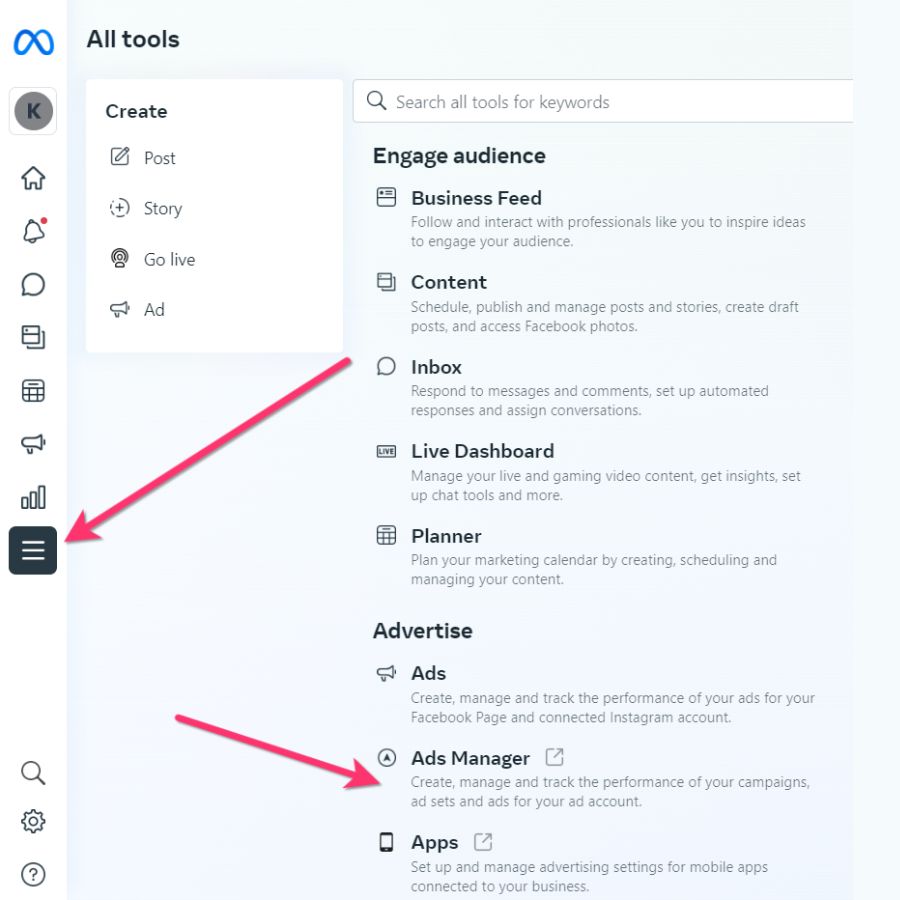
Step 1: Open Ads Manager and click Create.
Step 2: Choose a campaign objective that fits your marketing goal – carousel ads can now be used with all six current objectives in Meta Ads Manager.
Step 3: Set up your audience, schedule, budget, and pacing, then click Continue.
Step 4: In the Conversion section, select the corresponding conversion location (skip this step if your objective is Awareness or App Promotion).
Step 5: Under Ad Setup, choose Manual Upload or Advantage+ Catalog Ad depending on your campaign type.
Step 6: Upload assets for card (1). Add title, description, URL, and CTA.
Step 7: Add more cards or delete any you do not need.
Step 8: Enable or disable Pixel tracking if your site has it.
Step 9: Preview placements across feeds and Instagram.
Step 10: Click Review, then Confirm to launch .
Use facebook ads multiple images to compare items in one unit. Choose carousel facebook ads to guide clicks to the right page per card.
5. Tips to Improve the Performance of Carousel Facebook Ads
To make carousel ads on facebook perform better, you should focus on visuals, structure, and clarity. Each card must capture attention and deliver value at a glance. Below are the best ways to boost results and keep users engaged.
5.1 Grab Attention with the First Image
The first card sets the tone for your ad. Use a clear, eye-catching picture that draws viewers in right away. Make sure it connects with your message and stands out from competitors. A strong start increases the chance of clicks and interaction. This ad format works best when the first image sparks curiosity and encourages users to swipe for more.
5.2 Follow Facebook’s Best Practices
To get the most out of facebook ads multiple images follow the platform’s creative and size recommendations. Keep images at the right dimensions and ensure text remains easy to read. Add short product names, offers, or call-to-action buttons under each card. Using this layout helps highlight different benefits while keeping the ad organized and user-friendly.
5.3 Create a Seamless Panoramic Image
Some advertisers choose to split one wide photo into smaller, connected panels. This technique tells a visual story as users swipe through each frame. To build this style of ads, plan your layout carefully:
- Use between 3–5 cards for the best flow.
- Set each image at 600 pixels high and 600 pixels wide per card.
- Combine them into one large image that matches your total width (for example, 2400×600 pixels for four cards).
- Upload and crop evenly to create a smooth, continuous look.
When done right, this approach makes carousel ads on facebook more dynamic and helps your message stand out in the feed, especially when utilizing dynamic creative optimization on Facebook to tailor your ads for better engagement.
6. FAQs about Carousel Ads on Facebook
6.1 How many cards can I include in one carousel ad on Facebook?
You can add between 2 and 10 cards per carousel ad. Each card can feature its own image, video, headline, and URL, allowing users to explore more without leaving the feed.
6.2 Do carousel ads on Facebook work better for eCommerce or services?
They’re effective for both. eCommerce brands use them to display multiple products, while service-based businesses use them to show features, steps, or success stories in a scrollable format.
6.3 What image size should I use for best results?
Use images with a 1:1 aspect ratio and a minimum resolution of 1080×1080 pixels. This ensures sharp visuals on all devices and helps your ad look consistent across placements.
That’s all you need to get started with carousel ads on facebook. When used the right way, this format can help you connect with more people and turn interest into action. It’s simple, flexible, and proven to deliver strong results for many brands. If you’re running a dropshipping business, consider ad account rental for dropshipping to scale your campaigns quickly. We hope this guide gives you the clarity and confidence to plan your next campaign. Try it out and see how this ad type can make your marketing more engaging and effective.