
What is ad library in Facebook and why are marketers relying on it more than ever? In a landscape where every brand fights for attention, this tool offers rare transparency into real, live ad activity across Meta platforms. It lets you uncover competitor tactics, spot emerging creative trends, and make informed decisions backed by data, not guesses. If you want to sharpen your ad strategy and stay ahead in a crowded marketplace, understanding this tool is your first advantage.
1. What is Facebook Ads Library?
The Facebook Ads Library is a public tool that Meta created to increase ad transparency. When users search for what is ad library in facebook, they want a place to view all active ads running across Facebook and Instagram. This library shows live ads, branded content labels, and basic details about each advertiser.

You do not need a Facebook account to use the tool. Anyone can search by keyword, Page name, or phrase. If an ad matches the term, it appears in the results. Ads with age limits, such as alcohol or gambling, will not show to people who are underage or not logged in. Meta uses the age that users report to apply these limits.
The facebook ads library report gives access to data on political, election, or social-issue ads. You can filter by country and time range. These reports are available only in places where Meta requires authorization to run such ads. For deeper research, the facebook ads library meta API provides programmatic access to political and EU-regulated content.
If you are asking what is facebook ad library or what is facebook ads library, think of it as a large, open archive. It contains millions of active creatives from brands of all sizes. Access is free, and you can use it without logging in. The tool helps marketers study trends, review competitor ads, and gather ideas for future campaigns.
Here are a few simple things the tool supports:
- Search for active ads by keyword or Page
- Check how brands run their campaigns
- Compare styles, messages, and formats for inspiration, including the use of dynamic Facebook Ads to automate product catalogs.
2. Where to find Facebook Ads Library?
You can open the Ads Library by visiting https://www.facebook.com/ads/library/.
Or type “Facebook Ads Library” into Facebook’s search bar. Both ways lead you to the same page.
The tool is free to use. No Facebook account or sign-in is needed to view public ads.
If you wonder what is ad library in facebook, this is the official spot to check live ads and branded posts.
Quick steps to reach it:
- Go to the URL above.
- Or search the name inside Facebook and pick the Ads Library result.
3. How to use Facebook Ads Library
The tool helps you review active campaigns across Meta platforms. It is useful when you want to understand what is ad library in facebook and how advertisers run their media. You can explore brands, keywords, and formats with ease. This section shows two simple ways to use the tool without adding new topics.
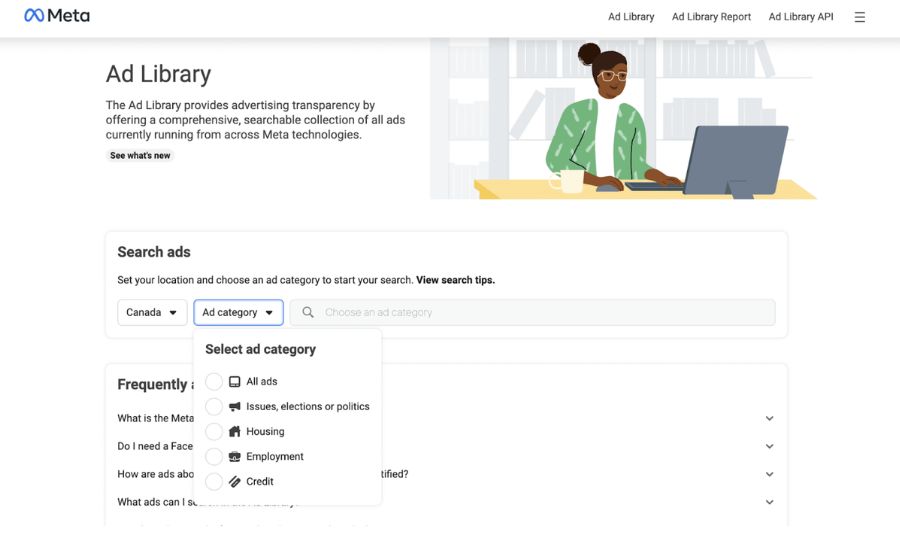
3.1. Use Facebook Ads Library via the search tool
Start by opening the official page at https://www.facebook.com/ads/library/.
This is the main place to check ads and run a Facebook Ads Library search. It works even without a login.
Follow these steps:
Step 1: Choose the country and the ad category.
You can view “All Ads” or select a specific category, such as social issues, elections, or political content.
Step 2: Enter a brand name, product type, or keyword.
This helps you find ads that match your topic. It is also useful when learning how to use the Facebook Ads library for basic research, or to find specific examples of Facebook shop ads to see how top e-commerce brands are displaying their storefronts.

Step 3: Apply filters to narrow results.
Filters may include:
- Language
- Advertiser name
- Platform and active status
- Display dates
Step 4: Review each ad in detail.
Check the run date, review the visuals, and look at the tone of the message. Some ads may show parameters that hint at retargeting or audience focus.
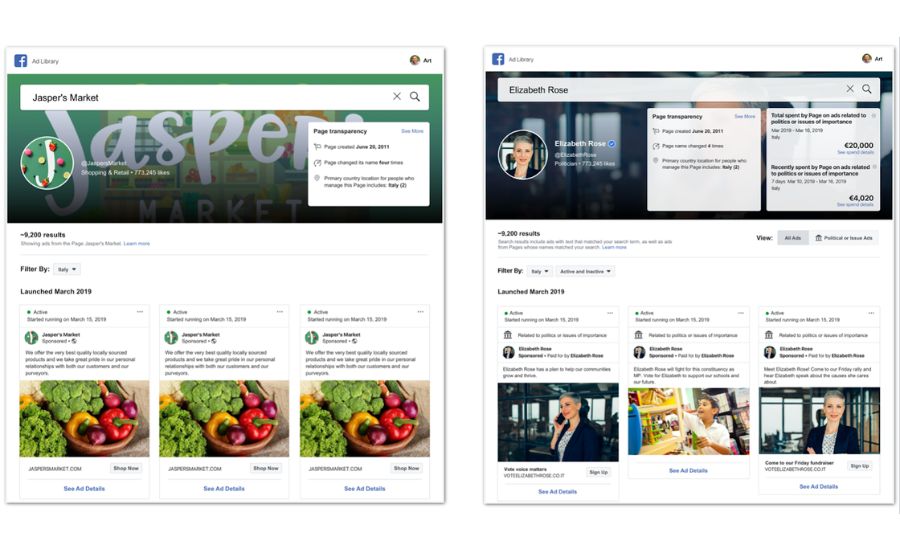
Step 5: Compare results.
Look for patterns among high-performing ads to understand what works in your field.
Using the tool in this way gives more clarity on what is facebook ads library and helps you assess market activity.
3.2. Use Facebook Ads Library from a Fanpage
You can also open the Ads Library from a specific Page on Facebook.
Step 1: Go to the Page you want to review.
Open it on the web or in the app.
Step 2: Go to About and choose Page Transparency.
Here, you will see key Page data and a notice if the Page is running ads.
Step 3: Select See All, then scroll to the end and click Go to Ads Library.
This takes you to all published ads linked to that Page.
You can then use filters or check each creative one by one. This method is direct and helpful when you want to explore a single advertiser. It also supports deeper review when working with a Facebook Ads Library report or looking at Facebook Ads Library meta data.
4. Should you use Facebook Ads Library?
Yes. The tool is free, open to everyone, and very simple to work with. It is useful whether you are a marketer, a business owner, or anyone who wants to understand how ads appear on Meta platforms. It also helps you see what is ad library in Facebook in a clear and practical way.
4.1. Benefits for advertisers
Advertisers gain a strong advantage from this tool because it helps them review market activity and refine their own strategy.
- Competitor insights: You can see the creative style, target groups, and messaging your competitors use. This view makes it easier to spot what works and what does not.
- Performance assessment: Compare your campaign elements with similar brands to discover strengths, gaps, and chances to improve. High-quality creatives boost engagement and lower costs, directly optimizing CPC in Facebook Ads
- Better planning: Study winning ads, avoid weak ideas, and shape more effective concepts. This process also supports those who want to understand what Facebook Ads Library is and how it reveals real-time activity.
- Transparency checks: The tool helps you confirm if your ads follow Meta rules. It also exposes misleading or fake ads. This feature is helpful when working with a Facebook Ads library report for compliance reviews.
- Campaign optimization: You can spot new trends, note the styles that gain traction, and draw ideas for fresh tests using Facebook Ads AI tools.
These points make the tool valuable for anyone learning how to use facebook ads library for research and creative planning.
4.2. Benefits for users
Regular users can also gain value from the platform, especially when they want to confirm ad sources or check credibility.
- Clearer ad information: You can see who created the ad and why it appears. This helps you judge accuracy and avoid misleading content.
- Stronger privacy control: If an ad feels irrelevant or intrusive, you can report it. Reviewing ads in the tool also helps you understand how targeting works, which supports safer browsing.
5. Tips to make the most of Facebook Ads Library
The tips below help you use this resource more effectively and support deeper facebook ads library search insights.
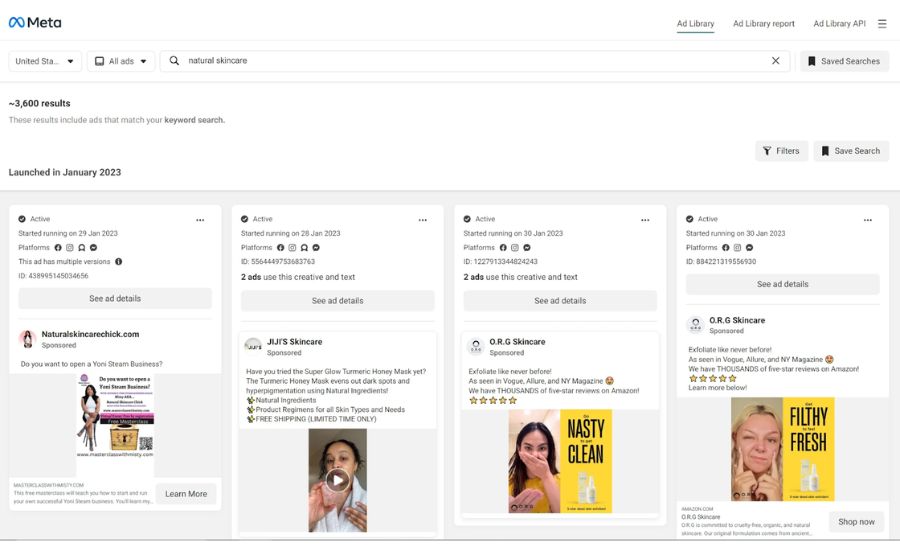
5.1. Track your competitors’ ads
Checking a competitor’s ads once won’t tell you enough about their approach. Visit often to see if they adjust their creative, shift their message, or introduce new formats. This steady review supports better analysis of what is ad library in Facebook and helps you spot changes in their style or goals.
5.2. Check ad running duration
Ad duration is a useful signal. Short-lived ads often underperform, while long-running ads tend to deliver stable results. You can mirror the structure of successful ads in your own campaigns. This is also helpful when learning how to use Facebook Ads Library or when reviewing patterns through a Facebook Ads Library report.
5.3. Identify seasonal trends
Use the date filter to see how competitors adjust their ads around holidays or peak buying periods. Many brands highlight sales, limited offers, or trend-based content during these times. These observations help shape your own seasonal plan without drifting away from what is Facebook Ads Library as a research tool.
5.4. Learn competitors’ targeting strategies
If you are viewing ads within the EU, transparency tools show who the ads are reaching. This includes age groups and general audience segments. These insights help refine your targeting and also reveal how others structure their outreach across Meta platforms. It fits well with the purpose of Facebook Ads Library meta and supports smarter ad planning.
6. FAQs about Facebook Ads Library
Why are some Fanpages not shown in Facebook Ads Library?
Some Pages do not appear because the Facebook Ads Library search prioritizes results by the number of Page likes. Pages with low engagement may not show up. This sorting system helps highlight accounts with higher activity.
Do you need a Facebook account to use Facebook Ads Library?
You can access the tool without logging in. Most ads remain visible to everyone. A few ads may require sign-in to view full details. This rule applies across the Meta ecosystem, including features tied to Facebook Ads Library Meta.
Where can I see the targeting choices advertisers use for ads about social issues, elections, or politics?
For these categories, Meta provides extra transparency. You can see demographic ranges and delivery insights in the ad detail panel. This section works like a simplified Facebook Ads library report, letting you explore age, location, and audience groups.
Do I need a Facebook account to use the Ads Library?
No account is required to open the tool or browse active ads. You may need one only when Meta restricts sensitive content. If you are searching what is ad library in Facebook, this accessibility is one of the key advantages for researchers and marketers.
Understanding what is ad library in Facebook allows you to use transparent data to refine your targeting, improve your creative direction, and strengthen the overall performance of your campaigns. But to run ads smoothly, you also need stable and trusted ad accounts. If you’re looking for a secure and high-reliability solution, consider NEMI Ads’ ad account rental service, designed to help you launch campaigns with confidence and minimize advertising risks.